This is the multi-page printable view of this section. Click here to print.
Blog - NullPrivate Tech Sharing & Product Updates
- NingPing Ad-Block: DNS-Based Intelligent Ad-Filtering Solution
- Alibaba Cloud DNS Free Tier Rate Limit: The End of Free Lunch and Rethinking DNS Autonomy
- Building Home DNS Resilience from Two 1.1.1.1 Incidents
- DoH vs DoT Technical Comparison
- DNS Privacy Protection and User Profiling Mitigation Strategies
- Deep Dive: NullPrivate DNS Proxy – Bypass Restrictions and Safeguard Privacy
- Rebranding Announcement for AdGuardPrivate
- Added DDNS Feature
- Better ECS Support
- NullPrivate - Enhanced DNS Service Based on AdGuard Home
- Full Support for HTTP/3 Protocol
- Introducing Custom Client Name Feature
- The Necessity of Ad Blocking: Safeguarding Attention and Privacy in the Digital Age
- Service Resource Optimization Strategy Guide
- Basic Memory Limit Adjustment
- Always Here to Support You
- How to Set Up a Dedicated Link
- All-new Upgrade – Enhanced Ad-blocking Rules
- Trial Service Details
NingPing Ad-Block: DNS-Based Intelligent Ad-Filtering Solution
In today’s digital era, advertising has become an integral part of the internet ecosystem, yet excessive ads not only degrade user experience but also pose privacy risks. NingPing (NullPrivate), a DNS service focused on privacy protection, adopts DNS-filtering technology similar to AdGuard Home to provide users with an effective ad-blocking solution.
How NingPing Ad-Block Works
NingPing’s ad-blocking relies on DNS (Domain Name System) filtering. The workflow is as follows:
flowchart TB
    A[User Device] --> B{DNS Query}
    B --> C[NingPing DNS Server]
    C --> D[Query Domain Database]
    D --> E{Ad or Tracker Domain?}
    E -->|Yes| F[Return Null or Loopback]
    E -->|No| G[Return Correct IP]
    F --> H[Block Ad Load]
    G --> I[Normal Site Access]
DNS Request Monitoring
When your device tries to visit a website, it first queries the DNS server for the domain’s IP address. Acting as your primary DNS server, NingPing receives and analyzes these queries.
Intelligent Filtering
NingPing maintains a large database of advertising and tracking domains. When it detects a request for such a domain, the system blocks it immediately.
Efficient Response
For blocked requests, NingPing returns a null address or the local loopback address (e.g., 127.0.0.1), preventing ad content from loading. For legitimate requests, NingPing supplies the correct IP so users can access the intended site normally.
Technical Advantages
Efficiency
- Network-level blocking: Ads are stopped at the DNS-resolution stage, before any web content is downloaded.
- Millisecond-level response: Localized DNS responses add virtually no latency.
- Whole-network protection: One configuration shields every device on the network.
Precision
- Multi-layer filtering: Supports exact domain matching, wildcard rules, and regular expressions.
- Smart categorization: Rules are grouped by ads, trackers, malware, etc.
- Dynamic updates: Regularly pulls the latest rules from trusted sources.
Privacy Protection
- No-trace browsing: No user-visit logs are kept.
- Reduced data leakage: Prevents advertisers and trackers from harvesting user data.
- Local processing: Most filtering occurs locally, minimizing data exposure.
Similarities to AdGuard Home
NingPing and AdGuard Home share the same core ad-blocking principles:
- DNS-based filtering: Both intercept DNS queries to block ad domains.
- Rule management: Both allow custom rules and whitelist/blacklist configuration.
- Network-wide protection: Both can safeguard an entire LAN.
- Open-source community: Both benefit from community-maintained filter lists.
User-Experience Optimizations
NingPing is designed to block ads effectively without disrupting normal use.
Transparent Management
- Detailed blocking statistics let users see protection effectiveness.
- Flexible whitelist settings prevent accidental blocking of important sites.
- Rule updates take effect instantly—no device restart required.
Ease of Use
- Simplified setup process—accessible even for non-technical users.
- Multi-language support for global audiences.
- Compatible with all network environments and device types.
- Secure, reliable DNS infrastructure.
Privacy Safeguards
- Strict privacy measures protect user data.
- No personally identifiable information is collected.
- User data remains secure.
Usage Recommendations
For optimal ad-blocking:
- Configure rules wisely: Choose filter lists that match your needs.
- Check for updates regularly: Keep rule databases current.
- Review statistics: Use stats to gauge blocking effectiveness.
- Adjust whitelists promptly: Add mistakenly blocked sites to the whitelist.
Conclusion
Using advanced DNS filtering, NingPing delivers an efficient, precise, and privacy-centric ad-blocking solution. We protect users from intrusive ads while preserving normal web experiences. Choose NingPing for a cleaner, safer internet.
In the digital age, everyone deserves a private, uncluttered online space. NingPing is built to deliver exactly that, helping users reclaim control of their digital lives.
Alibaba Cloud DNS Free Tier Rate Limit: The End of Free Lunch and Rethinking DNS Autonomy
On May 14, 2026, Alibaba Cloud released a low-key but far-reaching product announcement: starting from June 24, the public network authoritative resolution free version of Cloud DNS will add a daily resolution limit of 100,000 times per domain name. Exceeding this limit will trigger dynamic speed limiting—latency, packet loss, or both1. The announcement was cautiously worded, stating that “the vast majority of free users’ daily resolution volume is far below this threshold,” making it seem like everything is calm.
But the true weight of this announcement lies not in the technical parameters themselves, but in the turning point it marks: The free DNS services of mainstream Chinese cloud providers are shifting from a ‘default sufficient’ stage to a ’needs accounting’ stage. For independent developers, individual webmasters, and small to medium-sized teams relying on free DNS, this is not an isolated price adjustment, but a repricing of the entire DNS service business logic.
Is 100,000 Times Enough: The Real Composition of Resolution Volume
The official statement that “the vast majority of users are unaffected” may be statistically true—if only looking at the median. But the problem is that for a normally running service site, its DNS resolution volume is affected by multiple overlapping factors, and 100,000 times/day is not a threshold that allows for complacency.
The core variables affecting single-domain resolution volume include:
Number of subdomains. The limit is “per domain name,” but here “single domain name” refers to the sum of resolution volumes of the primary domain and all its subdomains1. If a site uses multiple subdomains like www, api, cdn, static, the resolution of each subdomain will be counted toward the total. For a moderately complex web application, the resolution volume can easily multiply several times.
TTL and actual caching behavior. Theoretically, recursive resolvers cache resolution results according to TTL, thereby reducing origin queries. But in reality: domestic carrier-grade recursive resolvers generally do not strictly adhere to TTL, some even refresh before TTL expiration, or ignore overly long TTL values and shorten them on their own. This means the actual number of origin queries may far exceed theoretical values.
Crawlers and scanners. Search engine crawlers, security scanners, SEO tools, etc., continuously trigger DNS resolution. This traffic does not generate page visits but同样 consumes resolution quotas.
Mobile and IoT devices. The DNS caching behavior of mobile apps differs from browsers; some implementations re-resolve every cold start. The DNS implementation of IoT devices is even more inconsistent, with many devices not caching at all or having extremely short cache times.
There is a real case for reference: the independent blog yijile.com discovered after the announcement that its daily resolution volume exceeded 300,000 times, approaching 300% of the limit2—while the site’s page visits were far from reaching the same order of magnitude. This indicates a significant non-linear relationship between DNS resolution volume and website UV/PV, making it unreliable to estimate ‘daily resolution volume’ using ‘daily visits’.
flowchart TB
    A[Domain Name Resolution Request] e1@--> B{Request Source}
    B e2@-->|Browser| C[Cache hit within TTL, no origin query]
    B e3@-->|Mobile App| D[Cold start re-resolution, frequent origin queries]
    B e4@-->|Crawler/Scanner| E[Continuous origin queries, high consumption]
    B e5@-->|IoT Device| F[Uncontrollable caching behavior, frequent origin queries]
    B e6@-->|Recursive DNS violates TTL| G[Early refresh, origin query volume far exceeds theoretical value]

    C e7@--> H[Counted against quota: small amount]
    D e8@--> I[Counted against quota: large amount]
    E e9@--> I
    F e10@--> I
    G e11@--> I

    H e12@--> J[Total resolution volume ≤ 100k/day]
    I e13@--> K[Total resolution volume >> 100k/day]

    J e14@--> L[Unaffected]
    K e15@--> M[Trigger speed limit: latency/packet loss]

    classDef source fill:#E3F2FD,stroke:#1565C0,color:#0D47A1
    classDef good fill:#E8F5E9,stroke:#2E7D32,color:#1B5E20
    classDef bad fill:#FFEBEE,stroke:#C62828,color:#B71C1C
    classDef animate stroke:#EF6C00,stroke-width:2px,stroke-dasharray: 9 5,stroke-dashoffset: 900,animation: dash 25s linear infinite

    class A,B source
    class C,H,J,L good
    class D,E,F,G,I,K,M bad
    class e1,e2,e3,e4,e5,e6,e7,e8,e9,e10,e11,e12,e13,e14,e15 animate
The Business Logic Behind Speed Limiting: The End of Free is Speed Limiting
Alibaba Cloud is not the first vendor to set thresholds for free DNS, nor will it be the last.
From a business perspective, free DNS is a ’negative asset’ for cloud providers—it consumes infrastructure resources (global resolution nodes, bandwidth, operations manpower) but generates almost no direct revenue besides brand exposure and user entry value. When user scale is small, this investment can be viewed as customer acquisition cost; but when the scale of free users expands to affect overall stability, speed limiting becomes an inevitable choice.
The ‘continuously rising total resolution volume borne by the platform’ and ‘avoiding local traffic spikes or abnormal queries affecting normal business’ mentioned in the announcement, when translated into business language, mean: The excessive use by free users has begun to erode the SLA guarantees of paying users.
This logic is consistent with the path of international vendors like Cloudflare and Google Cloud DNS: first use free services to establish a user base and market recognition, then gradually tighten free quotas and guide commercial conversion. The difference is that Alibaba Cloud chose a more direct ‘hard speed limit’ rather than ‘pay-as-you-go after exceeding the limit’—this precisely reflects the competitive landscape of the domestic cloud service market: when the migration cost for free users is low enough, vendors tend to directly cut off excessive users rather than converting them through refined billing.
Domestic Alternatives: Who Can Still Bear the Free Burden
For sites with daily resolution volume potentially exceeding 100,000 times, migrating to alternative DNS services is a realistic option. Below is a comparison of core dimensions of current mainstream domestic free DNS services:
| Service Provider | Free Tier Resolution Limit | Split-horizon DNS | Minimum TTL | DDoS Protection | Notes |
|---|---|---|---|---|---|
| Alibaba Cloud DNS | 100k times/day (from 2026.6.24) | Supported in paid version | 120s (free tier) | Basic | The protagonist of this speed limit |
| Tencent Cloud DNSPod | No explicit daily resolution limit | Supported in free tier (carrier/region/search engine routes) | 1s | Basic | The most mature domestic alternative |
| Huawei Cloud DNS | No explicit daily resolution limit | Supported in paid version | Determined by package | Basic | Relatively lenient, suitable for Huawei ecosystem users |
| Volcano Engine TrafficRoute | No explicit daily resolution limit | Basic routes supported in free tier | 1s | Basic | Produced by ByteDance, newer ecosystem |
Tencent Cloud DNSPod is currently the most transparent alternative option. Its free tier explicitly supports split-horizon DNS by carrier (Telecom, Mobile, Unicom), by region (domestic/overseas), and dedicated search engine routes. For sites that need to distinguish between domestic and overseas resolution or carrier optimization, this is a differentiated capability that Alibaba Cloud’s free tier cannot provide.
But what needs to be警惕 is: No speed limit today does not mean there won’t be one tomorrow. DNSPod’s free tier also faces resource pressure from user growth; it just hasn’t reached the trigger threshold yet. When choosing an alternative, do not equate ’no current restrictions’ with ‘will never have restrictions’.
Migration Strategy: Not as Simple as Changing an NS
DNS migration is not technically complex—simply modify the NS records at the domain registrar and wait for global recursive resolvers to update. But there are several easily overlooked key points in actual operation:
Record export and format compatibility. Different DNS providers have varying levels of support for record types. Some extended record types supported by Alibaba Cloud (such as explicit/implicit URL forwarding) may be implemented differently or not supported by DNSPod and other providers. Before migration, all records need to be fully exported and verified one by one.
TTL transition period design. When migrating NS, the old and new authoritative DNS systems will coexist during the transition period (depending on the TTL of the old NS records). Best practice is: first configure identical records on the target platform, verify they are correct, then switch the NS to the new platform. Before switching, lower the SOA record TTL of the old NS (e.g., to 300 seconds) to shorten the transition window.
Split-horizon DNS strategy migration. If you originally relied on Alibaba Cloud’s paid split-horizon DNS, migrating to DNSPod’s free tier can directly reuse route configurations; if migrating to a platform that does not support free split-horizon DNS, you need to evaluate whether to accept a single resolution strategy.
Monitor first. Before complete switching, establish resolution monitoring—continuously probe key subdomains from multiple network environments (Telecom, Unicom, Mobile) to ensure that resolution results and latency after migration are within acceptable ranges.
sequenceDiagram
    participant U as User/Ops
    participant S as Source DNS (Alibaba Cloud)
    participant T as Target DNS (e.g., DNSPod)
    participant R as Recursive Resolver

    U->>S: 1. Export all DNS records
    U->>T: 2. Create and verify records one by one on target platform
    U->>T: 3. Verify resolution correctness from multiple network environments
    U->>S: 4. Lower SOA TTL to 300s, wait for old TTL to expire
    U->>R: 5. Modify NS at domain registrar to point to target platform
    R->>T: 6. Recursive resolvers gradually update to new NS
    U->>T: 7. Continuously monitor resolution latency and correctness
    U->>S: 8. After confirming stable migration, delete source platform records
Deeper Level: The Structural Dilemma of Free DNS Services
Looking at a longer historical dimension, Alibaba Cloud DNS free tier speed limiting is not an isolated incident, but the surfacing of structural problems in the free DNS service model.
DNS authoritative resolution is a ’low margin, high volume’ infrastructure service—marginal cost is extremely low, but stability and availability requirements are extremely high. When a free service’s hosted domains grow from hundreds of thousands to millions, and resolution volume grows from hundreds of millions to hundreds of billions, the sustainability of the free model faces fundamental questions: either implement speed limiting and traffic diversion, or degrade service quality, or convert to a paid model.
The dilemma for cloud providers is that DNS is the most底层 internet entrance—domain resolution failure means the entire business is unreachable. Users won’t distinguish ’this is the free version so the service quality is poor,’ but will only attribute it to ‘Alibaba Cloud/Tencent Cloud is not good.’ This pressure of ‘free service holding brand reputation hostage’ is the key factor driving the speed limiting decision.
For webmasters and developers, the lesson from this is not ‘quickly switch to another free platform,’ but: Any free, non-self-controlled infrastructure dependency has an inherent expiration date. Today it’s Alibaba Cloud limiting speed, tomorrow it could be DNSPod, and the day after tomorrow it could be Cloudflare Free Plan adjusting its terms.
Conclusion
Alibaba Cloud DNS free tier speed limit of 100,000 times/day is not harsh in absolute terms, but the signal it sends is more important than the number: The free DNS bonus period for domestic cloud providers is narrowing.
For the vast majority of sites with daily resolution volume far below the threshold, nothing needs to be done. For sites near the临界 line, it is recommended to immediately enable resolution volume monitoring and understand their true usage before making a decision. For sites that have already exceeded or are about to exceed the limit, DNSPod’s free tier is currently the most pragmatic migration target, but incorporating DNS self-control into medium and long-term planning—whether through multi-vendor redundant deployment or self-built authoritative DNS (even lightweight NSD or CoreDNS instances)—is worth serious consideration.
Free is temporary, controllable is long-term.
Alibaba Cloud. “Product Change” Cloud DNS - Public Network Authoritative Resolution Free Tier Speed Limit Notice. 2026-05-14. https://www.aliyun.com/notice/118259 ↩︎ ↩︎
Yijile. “Alibaba Cloud DNS Free Tier Limits Single Domain to 100k Resolutions, Switch to Better Alternative Products.” 2026-05-24. https://yijile.com/zh/alibaba-cloud-dns-resolution-limit-replacement-products/ ↩︎
Building Home DNS Resilience from Two 1.1.1.1 Incidents
Many users treat DNS as a “fill‑in‑the‑address‑and‑done” setting, but the two publicly disclosed incidents in 2024 and 2025 show that the resolver itself can fail, and the impact is immediately felt as “pages won’t load, apps can’t connect, the whole house loses internet”.
This article does not compare providers; it focuses on one goal: turning DNS from a single‑point dependency into an observable, switchable, and recoverable home‑grade infrastructure.
Two Verifiable Events: What Happened
First, the key timestamps from public reports (all UTC, aligned with official timelines):
| Event | Public Date | Key Impact | Root‑Cause Type |
|---|---|---|---|
| Cloudflare 1.1.1.1 incident (2024‑06‑27) | 2024‑07‑04 post‑mortem published | Users in some regions unreachable or experiencing high latency | External routing event (BGP hijack + route leak) |
| Cloudflare 1.1.1.1 incident (2025‑07‑14) | 2025‑07‑15 post‑mortem published | Majority of global users affected; official 62‑minute outage window | Internal misconfiguration causing prefix withdrawal |
Both incidents share a common trait:
- From the user’s perspective the symptom is “DNS stopped working”;
- The underlying causes are completely different (one is an external internet‑routing issue, the other an internal service change);
- The conclusion is the same: a single upstream, a single entry point, and a single protocol concentrate risk at one spot.
Technical Breakdown: Why DNS Appears “Broken Everywhere”
When a device points its sole DNS to an unavailable target, the application layer typically cascades:
- Domain names cannot be resolved, showing
timeoutorSERVFAIL. - Browsers and apps retry repeatedly, creating a “sometimes works, then fails again” jittery experience.
- Even if the upstream link is healthy, users mistakenly think “the broadband is broken” or “all websites are down”.
flowchart LR
    A[Phone / Tablet / TV / PC] --> B[Encrypted DNS entry DoH/DoT]
    B --> C{Policy Layer}
    C --> D[Ad / Tracker Domain Blocking]
    C --> E[Family Protection & Parental Controls]
    C --> F[Whitelist & Custom Rules]
    C --> G[Primary Upstream Resolver]
    C --> H[Backup Upstream Resolver]
    G --> I[Authoritative DNS / CDN]
    H --> I
    C --> J[Query Logs & Blocking Statistics]
The diagram’s focus is not “pile on more features”; it highlights three essentials:
- Path separation: decouple the access layer (DoH/DoT) from the policy layer (blocking/whitelisting).
- Upstream redundancy: when the primary upstream fails, a backup resolution path remains available.
- Observability: logs and statistics let you determine whether a block is a false positive, an upstream outage, or a client‑side issue.
Practical Home‑Network Implementation
Based on the nullprivate/adguardprivate service maintained by jqknono, a workable approach includes:
Use an encrypted DNS entry (DoH/DoT)
- Reduces exposure of plain‑text DNS and mitigates local‑network interference.
- Leverage client‑ID / device identifiers to differentiate each household device.
Configure primary + backup upstream resolvers
- Avoid betting all resolution on a single provider or a single prefix.
- Combine split‑routing so different domain categories use distinct upstream paths.
Centralize “ad‑blocking, anti‑phishing, parental‑control” in the policy layer
- Block advertising and tracking domains.
- Block malicious/phishing domains.
- Apply time‑based and content restrictions for children’s devices.
Maintain a false‑positive correction channel
- Use query logs to pinpoint blocked domains.
- Quickly add entries to a whitelist to avoid prolonged service disruption.
Run regular “failure drills”
- Temporarily take the primary upstream offline and verify that the backup path activates.
- Test critical home apps (payment, online classes, video conferencing) on the home network.
A Common Misconception
Many believe that “using encrypted DNS guarantees zero downtime”. In reality, encryption only protects the transport channel’s privacy and integrity; it does not automatically provide high availability. High availability comes from:
- Upstream redundancy design;
- Reasonable policy configuration;
- Executable monitoring and emergency procedures.
Operational Checklist
- Do you still rely on a single DNS provider?
- Are you using only one protocol (DoT or DoH) with no fallback?
- Can you locate a “false block vs. upstream outage” within 3 minutes via logs?
- Are elder or child devices configured with dedicated family‑protection policies?
- Have you performed at least one switchover drill this month?
If most answers are “no”, the next public DNS incident will likely hit your home network directly.
References (publicly verifiable)
- Cloudflare: 2024‑06‑27 1.1.1.1 incident post‑mortem (includes BGP hijack & route‑leak timeline)
https://blog.cloudflare.com/cloudflare-1111-incident-on-june-27-2024 - Cloudflare: 2025‑07‑14 1.1.1.1 incident post‑mortem (includes 62‑minute outage details & remediation timeline)
https://blog.cloudflare.com/cloudflare-1-1-1-1-incident-on-july-14-2025/ - Cloudflare Radar (useful for observing DNS availability changes during public incidents)
https://radar.cloudflare.com/
For individuals and families, DNS is not merely a “make it faster” tweak—it is a fundamental security and availability concern. Combining encrypted DNS, ad blocking, family protection, and observability gives you the best chance to minimize damage and anxiety when a real DNS outage occurs.
DoH vs DoT Technical Comparison
DNS over HTTPS (DoH) and DNS over TLS (DoT) are two common encrypted DNS transport methods. Both can protect DNS queries from being easily eavesdropped on or tampered with, but they rely on different protocol stacks.
Here’s the conclusion first:
- DoH: Carries DNS over HTTP, making it easier to reuse existing Web infrastructure.
- DoT: Carries DNS directly over TLS, with a shorter protocol path and a more straightforward structure.
- Both share the same core goal: Protecting the privacy and integrity of DNS queries.
The corresponding standards are as follows:
| Protocol | Standard | Description |
|---|---|---|
| DoT | RFC 7858 | DNS over TLS |
| DoH | RFC 8484 | DNS Queries over HTTPS |
To truly understand the differences between the two, it’s best to start with the network protocol hierarchy.
Network Protocol Hierarchy
Modern network protocol stacks use a layered design, with each layer responsible for different tasks. Although DNS is an application-layer protocol, it is not tightly bound to any specific transport method.
Here’s a quick reference table to understand the role of each layer:
| Layer | Common Protocols | Primary Role |
|---|---|---|
| Application Layer (L7) | DNS, HTTP/1.1, HTTP/2, HTTP/3, FTP | Defines application semantics |
| Security Layer | TLS, DTLS | Provides encryption and identity verification |
| Transport Layer (L4) | TCP, UDP, QUIC | Handles connections, retransmission, flow control, etc. |
| Network Layer (L3) | IPv4, IPv6 | Handles routing and forwarding |
| Data Link Layer (L2) | Ethernet, Wi‑Fi | Handles local link transmission |
Here are a few key points:
- DNS belongs to the application layer.
- TLS sits between the application layer and the transport layer.
- HTTP/3 is still an application layer protocol, it just runs on top of QUIC.
- QUIC is often regarded as an “enhanced transport layer”, because it integrates reliable transmission, congestion control, multiplexing, and encrypted handshake capabilities.
If you strip away TLS from DoT, it is essentially close to DNS over TCP. This shows that “whether encryption is used” and “which transport DNS runs on” are actually two different dimensions.
Plain DNS Characteristics
The most common form of DNS is referred to as Plain DNS, typically running over UDP or TCP.
| Transport Method | Advantages | Disadvantages | Typical Characteristics |
|---|---|---|---|
| UDP | Low connection overhead, fast initial query | Unreliable, prone to packet loss | Most common form of traditional DNS |
| TCP | Has retransmission mechanism, more reliable | Higher handshake cost | Acceptable performance after long connection is established |
Simply put:
- UDP is lighter: Better suited for quick requests.
- TCP is more stable: More reliable when packet loss occurs.
- In certain network environments, especially when UDP packet loss is severe, TCP may actually be more stable.
Some carriers tend to drop UDP packets preferentially during network congestion. In such cases, DNS queries relying on UDP will be affected, while TCP, with its retransmission capability, often achieves more stable results.
Application Layer Nesting
Both DNS and HTTP are application layer protocols, so DoH can be seen as “the application layer wrapping another application layer”.
There are two key points to grasp here:
- The core of DoH is not the name “HTTP”, but the HTTP transport mechanism.
- Theoretically, DNS can be carried over many application layer protocols, but in practice there is no need to make it overly complex.
For example:
- DoH = Placing DNS requests inside HTTP requests.
- Unencrypted HTTP can also carry DNS, but it offers virtually no practical advantage.
- Theoretically, you could even do “DNS over FTP”, but there is no real-world value in doing so.
flowchart TD
    subgraph L7["Application Layer"]
        A[DNS]
        B[HTTP]
        C[FTP]
    end

    subgraph Security["Security Layer"]
        D[TLS]
        E[DTLS]
    end

    subgraph Transport["Transport Layer"]
        F[TCP]
        G[UDP]
        H[QUIC]
    end

    subgraph L3["Network Layer"]
        I[IP]
    end

    subgraph L2["Data Link Layer"]
        J[Ethernet]
        K[WiFi]
    end

    A --> D
    B --> D
    C --> D
    D --> F
    E --> G
    H --> G
    F --> I
    G --> I
    H --> I
    I --> J
    I --> K

    style A fill:#e1f5ff
    style B fill:#e1f5ff
    style C fill:#e1f5ff
    style D fill:#fff4e1
    style E fill:#fff4e1
    style F fill:#ffe1e1
    style G fill:#ffe1e1
    style H fill:#e1ffe1
Transport Layer Nesting
QUIC is based on UDP but provides many capabilities traditionally associated with the transport layer.
It typically has the following characteristics:
- Connection-oriented
- Congestion control
- Retransmission mechanism
- Flow control
- Multiplexing
- Deep integration with TLS 1.3
Therefore, QUIC can be understood as:
| Comparison Target | QUIC Characteristics |
|---|---|
| Compared to TCP | Typically lower latency for connection establishment and recovery |
| Compared to UDP | More reliable, more complete capabilities |
Protocol Combination Relationships
Application layer protocols and transport layer protocols are not one-to-one bound. The same application protocol can run on different transport methods.
Here’s a simplified overview table:
| Solution | Protocol Combination |
|---|---|
| Plain DNS | UDP/TCP + DNS |
| HTTP/2 | TCP + TLS 1.2/1.3 + HTTP/2 |
| HTTP/3 | QUIC + TLS 1.3 + HTTP/3 |
| DoT | TCP + TLS 1.2/1.3 + DNS |
| DoH | HTTP/2 or HTTP/3 + DNS |
| DoQ | QUIC + TLS 1.3 + DNS |
To summarize in one sentence:
- DoT: Shorter path, DNS runs directly over TLS.
- DoH: Goes through HTTP first, then carries DNS.
- DoQ: Uses QUIC to carry DNS directly.
flowchart LR
    subgraph DoT["DoT DNS over TLS"]
        direction LR
        T1[TCP] --> T2[TLS]
        T2 --> T3[DNS]
    end

    subgraph DoH2["DoH over HTTP/2"]
        direction LR
        H1[TCP] --> H2[TLS]
        H2 --> H3[HTTP/2]
        H3 --> H4[DNS]
    end

    subgraph DoH3["DoH over HTTP/3"]
        direction LR
        Q1[QUIC] --> Q2[TLS 1.3]
        Q2 --> Q3[HTTP/3]
        Q3 --> Q4[DNS]
    end

    subgraph DoQ["DoQ DNS over QUIC"]
        direction LR
        D1[QUIC] --> D2[TLS 1.3]
        D2 --> D3[DNS]
    end

    style T1 fill:#e3f2fd
    style T2 fill:#fff3e0
    style H1 fill:#e3f2fd
    style H2 fill:#fff3e0
    style Q1 fill:#e8f5e9
    style Q2 fill:#fff3e0
    style D1 fill:#e8f5e9
    style D2 fill:#fff3e0
Performance and Compatibility Analysis
Understanding the protocol combinations makes the differences between DoH and DoT more intuitive.
1. Performance
| Dimension | DoH | DoT |
|---|---|---|
| Theoretical low-latency potential | High, especially DoH/3 | Medium to relatively high |
| Dependence on UDP environment | DoH/3 relies on QUIC/UDP | Primarily relies on TCP |
| Stability in poor network conditions | Depends on HTTP/2 fallback | Generally more stable |
Simplified understanding:
- If the service provider supports HTTP/3, DoH often has better low-latency potential.
- If the network environment is unfriendly to UDP, DoT is generally more stable.
- Theoretical speed does not equal actual experience; carrier packet-dropping strategies directly affect results.
2. Privacy and Security
| Dimension | DoH | DoT |
|---|---|---|
| Transport encryption | Yes | Yes |
| Anti-eavesdropping / Anti-tampering | Yes | Yes |
| Common default port | 443 | 853 |
Key points:
- Both DoH and DoT are encrypted DNS.
- Both can effectively reduce the risk of DNS plaintext leakage.
- DoT is often said to be “easy to identify”, largely because port 853 is quite conspicuous, not because the protocol itself inherently exposes more information.
- In fact, DoT can also run on non-853 ports, though platform support varies.
3. Extensibility and Service Deployment
| Dimension | DoH | DoT |
|---|---|---|
| Reuse of existing Web infrastructure | Strong | Weak |
| Easy to reuse port 443 | Yes | No |
| Server-side scaling potential | Greater | Relatively limited |
This is more from the service provider’s perspective:
- DoH can directly leverage the mature HTTP service ecosystem.
- DoH is easier to deploy alongside other Web services on port 443.
- DoT is more like a “dedicated DNS service” with a purer protocol path, but its extensibility is not as strong as the HTTP ecosystem.
4. Platform Compatibility
| Platform / System | DoH | DoT |
|---|---|---|
| Chromium browsers | Supported | Depends on system or extensions |
| Windows 11 | Natively supported | Depends on configuration |
| Android 8+ | Supported in some scenarios | Natively supported |
| Android 11+ | Natively supported | Natively supported |
| macOS | Natively supported | Natively supported |
| iOS | Natively supported | Natively supported |
Overall trends:
- DoH’s platform adoption is increasingly widespread.
- DoT had an earlier start on Android.
- For ordinary users, which is more convenient often depends on whether the system provides a native entry point.
Practical Recommendations
If you only need a brief recommendation for ordinary users, you can refer to the table below:
| Scenario | More Recommended |
|---|---|
| Want simplicity and broad compatibility | DoH |
| Network is unfriendly to UDP | DoT |
| Service provider supports HTTP/3 | Try DoH first |
| System only provides a native DoT interface | Start with DoT |
Further details:
- For most users, DoH is generally more hassle-free.
- If the service provider supports DoH/3, it typically offers lower latency when the network is in good condition.
- If the network condition is poor, DoH may fall back to HTTP/2 to maintain availability.
- If the local network frequently drops UDP packets, DoT may be more stable than DoH/3.
What to Focus on When Choosing
It is recommended to evaluate in the following order:
- Whether the service provider supports HTTP/3 / DoH/3
- Whether your carrier’s network is prone to dropping UDP packets
- Whether your device natively supports DoH or DoT
- Whether you prioritize ease of configuration or network stability
A Practical Suggestion
Try NullPrivate, which supports both DoT and DoH/3, and also provides ad blocking and DNS split-horizon functionality. If you need to self-host, you can also use its open-source library.
Summary
To wrap up in three sentences:
- Both DoH and DoT significantly enhance DNS privacy protection.
- DoH leans toward compatibility and ecosystem reuse, while DoT leans toward directness and stability.
- For most users, DoH is generally the more balanced choice, but ultimately it still depends on the network environment and service provider support.
DNS Privacy Protection and User Profiling Mitigation Strategies
DNS Privacy Protection and User Profiling Mitigation Strategies
Audience: Engineers/Operators/Security Professionals concerned with network privacy and data governance
Keywords: Stub resolver, Recursive resolution, Authoritative server, QNAME minimization, ECS, DNSSEC, DoT/DoH/DoQ
Background and Problem Overview
In the digital age, users’ online behavioral data has become crucial for enterprises to construct user profiles. As a core component of internet infrastructure, the Domain Name System (DNS) performs the critical task of converting human-readable domain names into machine-readable IP addresses during daily network activities. However, traditional DNS queries are typically transmitted in plaintext over UDP port 53, making users’ browsing history, application usage patterns, and other sensitive information vulnerable to collection and analysis by network operators, ISPs, and various intermediaries.
User profiling refers to constructing characteristic models of users through collecting and analyzing various behavioral data. Enterprises leverage these models for precision marketing, content recommendation, risk assessment, and other commercial activities. While these services enhance user experience to some extent, they also raise concerns about privacy leaks, data misuse, and potential discriminatory pricing. Understanding how to reduce the accuracy of user profiling through DNS-level technical measures has become an important approach to protecting personal privacy.
This article begins with DNS fundamentals, analyzes data collection points in user profiling processes, explores DNS-based privacy protection strategies, and explains implementation approaches and considerations for different scenarios.
Fundamentals and Terminology
To understand DNS privacy protection, one must first grasp the basic DNS query workflow and related terminology. DNS queries typically involve multiple participants, each potentially becoming a privacy leakage point.
flowchart LR
    A[Client Device] e1@--> B[Stub Resolver]
    B e2@--> C[Recursive Resolver]
    C e3@--> D[Root Server]
    D e4@--> E[TLD Server]
    E e5@--> F[Authoritative Server]
    F e6@--> C
    C e7@--> B
    B e8@--> A
    C --> G[Cache Storage]

    e1@{ animation: fast }
    e2@{ animation: slow }
    e3@{ animation: medium }
    e4@{ animation: fast }
    e5@{ animation: medium }
    e6@{ animation: fast }
    e7@{ animation: fast }
    e8@{ animation: slow }

    style A fill:#e1f5fe
    style B fill:#f3e5f5
    style C fill:#fff3e0
    style D fill:#f1f8e9
    style E fill:#f1f8e9
    style F fill:#f1f8e9
    style G fill:#fce4ec
The stub resolver is the DNS client component in operating systems or applications, responsible for receiving DNS query requests from applications and forwarding them to recursive resolvers. Recursive resolvers (typically provided by ISPs or third-party DNS services) complete the full domain resolution process, including querying root servers, Top-Level Domain (TLD) servers, and authoritative servers, then returning final results to clients.
Authoritative servers store DNS records for specific domains and serve as the ultimate source of domain information. Caching mechanisms are essential components of the DNS system, where recursive resolvers cache query results to reduce duplicate queries and improve resolution efficiency. TTL (Time To Live) values determine how long DNS records remain cached.
EDNS Client Subnet (ECS) is an extension mechanism that allows recursive resolvers to transmit client subnet information to authoritative servers, aiming to improve CDN and geolocation service accuracy. However, ECS also exposes users’ geographical location information, increasing privacy leakage risks.
Privacy Threats and Motivations
Plaintext DNS queries provide rich data sources for user profiling construction. By analyzing DNS query logs, attackers or data collectors can obtain sensitive information including users’ browsing habits, application usage patterns, and geographical locations, enabling the construction of detailed user profiles.
flowchart TD
    A[User Online Behavior] e1@--> B[Plaintext DNS Queries]
    B e2@--> C[ISP Resolver]
    B e3@--> D[Public DNS Service]
    C e4@--> E[User Access Records]
    D e5@--> F[Query Logs]
    E e6@--> G[Behavior Analysis]
    F e7@--> G
    G e8@--> H[User Profile]
    H e9@--> I[Precision Advertising]
    H e10@--> J[Content Recommendation]
    H e11@--> K[Price Discrimination]

    L[Third-party Trackers] e12@--> M[Cross-site Correlation]
    M e13@--> G

    N[Device Fingerprint] e14@--> O[Unique Identifier]
    O e15@--> G

    e1@{ animation: fast }
    e2@{ animation: medium }
    e3@{ animation: medium }
    e4@{ animation: slow }
    e5@{ animation: slow }
    e6@{ animation: fast }
    e7@{ animation: fast }
    e8@{ animation: medium }
    e9@{ animation: fast }
    e10@{ animation: fast }
    e11@{ animation: fast }
    e12@{ animation: medium }
    e13@{ animation: fast }
    e14@{ animation: medium }
    e15@{ animation: fast }

    style A fill:#e1f5fe
    style B fill:#fff3e0
    style C fill:#ffebee
    style D fill:#ffebee
    style E fill:#fce4ec
    style F fill:#fce4ec
    style G fill:#f3e5f5
    style H fill:#e8eaf6
    style I fill:#fff9c4
    style J fill:#fff9c4
    style K fill:#ffcdd2
    style L fill:#ffebee
    style M fill:#fce4ec
    style N fill:#ffebee
    style O fill:#fce4ec
DNS query data provides value for user profiling construction in several aspects. First, query frequency and temporal patterns can reveal users’ daily routines, such as differences between weekday and weekend internet habits, or nighttime activity patterns. Second, queried domain types can reflect user interests, such as preferences for news websites, social media, video platforms, or shopping sites. Additionally, subdomain access patterns can provide granular behavioral analysis, such as whether users frequently access specific sub-feature pages of social platforms.
Geolocation information is a crucial component of user profiles. Through ECS mechanisms and analysis of recursive resolver locations, users’ physical locations or movement trajectories can be inferred. Combined with time-series analysis, frequently visited locations and activity ranges can be identified.
Cross-device identity correlation is another key aspect of user profiling. By analyzing specific patterns in DNS queries—such as query timing distributions for the same domain across different devices—multiple devices belonging to the same user can potentially be correlated to build more comprehensive profiles.
Commercial motivations drive user profiling construction. Precision advertising is the primary application, where enterprises analyze users’ browsing interests to display more relevant ads, improving conversion rates. Content recommendation systems leverage user profiles to provide personalized news, videos, and product suggestions, enhancing user engagement. Risk assessment applies to financial and insurance sectors, evaluating credit risks or fraud probabilities based on user behavior patterns.
Protection Strategies and Principles
To address DNS privacy leakage risks, the industry has developed multiple protection strategies focusing on three main directions: encrypted transmission, query obfuscation, and source control. These strategies each have distinct characteristics suitable for different scenarios and requirements.
flowchart TD
    A[DNS Privacy Strategies] --> B[Encrypted Transport]
    A --> C[Query Obfuscation]
    A --> D[Source Control]

    B --> B1[DoT - DNS over TLS]
    B --> B2[DoH - DNS over HTTPS]
    B --> B3[DoQ - DNS over QUIC]

    C --> C1[QNAME Minimization]
    C --> C2[Batch Queries]
    C --> C3[Timing Randomization]

    C1 --> C1A[Step-wise Transmission]
    C1 --> C1B[Reduced Exposure]

    D --> D1[Local Hosts]
    D --> D2[Trusted Recursive Resolvers]
    D --> D3[DNS Filtering]

    D2 --> D2A[Privacy Policy]
    D2 --> D2B[No-logging]
    D2 --> D2C[Third-party Audits]

    style A fill:#e1f5fe
    style B fill:#e8f5e8
    style C fill:#fff3e0
    style D fill:#f3e5f5
    style B1 fill:#e8f5e8
    style B2 fill:#e8f5e8
    style B3 fill:#e8f5e8
    style C1 fill:#fff3e0
    style C2 fill:#fff3e0
    style C3 fill:#fff3e0
    style D1 fill:#f3e5f5
    style D2 fill:#f3e5f5
    style D3 fill:#f3e5f5
Encrypted transport forms the foundation of DNS privacy protection, primarily comprising three technologies: DNS over TLS (DoT), DNS over HTTPS (DoH), and DNS over QUIC (DoQ). DoT uses TCP port 853 to transmit encrypted DNS queries, providing end-to-end encryption through TLS. DoH encapsulates DNS queries within HTTPS traffic using standard port 443, better integrating with existing network environments and avoiding identification/blocking by firewalls or network management devices. DoQ is an emerging solution based on the QUIC protocol, combining UDP’s low latency with TLS security while supporting advanced features like connection migration.
QNAME minimization (RFC7816) is a query obfuscation technique where recursive resolvers incrementally send domain components to upstream servers rather than complete domain names. For example, when querying “www.example.com”, it first queries “com”, then “example.com”, and finally “www.example.com”. This approach reduces complete domain exposure to upstream servers but may increase query latency.
Batch queries and timing randomization are additional obfuscation methods. Batch queries distribute multiple DNS requests across different times to prevent behavioral correlation through query patterns. Timing randomization introduces random delays between queries to disrupt temporal pattern analysis.
Source control strategies focus on DNS query origination points. Local hosts files can bypass DNS queries for frequently accessed domains, reducing query records. Trusted recursive resolver selection involves choosing DNS providers with strict privacy policies, such as those committing to no query logging and rejecting third-party tracking. DNS filtering blocks known trackers and malicious domains to minimize unnecessary data exposure.
Implementation Paths and Considerations
Implementing DNS privacy protection requires balancing technical feasibility, performance impact, and deployment complexity. When selecting and implementing specific solutions, trade-offs between privacy protection effectiveness and practical usability must be carefully considered.
Encrypted DNS deployment can adopt multiple approaches. Operating system-level support represents the ideal scenario, with Android 9+, iOS 14+, and Windows 11 all featuring built-in DoH or DoT support. Application-level implementation suits specific software, such as browsers with built-in encrypted DNS functionality. Network device-level deployment configures encrypted DNS on routers or firewalls to protect entire networks.
QNAME minimization implementation primarily relies on recursive resolvers, requiring users to select DNS services supporting this feature. Note that QNAME minimization may impact certain performance optimizations relying on complete domain information, such as prefetching and load balancing.
Selecting trusted recursive resolvers involves evaluating multiple factors. Privacy policies are paramount, including whether query logs are recorded, log retention periods, and data sharing policies. Service performance affects user experience through resolution latency, availability, and global distribution. Service transparency is also crucial, such as whether operational policies are publicly disclosed and undergo third-party audits.
DNS filtering requires attention to false positives and negatives. Overly aggressive filtering may block legitimate websites, while overly lenient filtering fails to adequately protect privacy. Regular filter list updates and customizable allowlists provide necessary balancing measures.
Hybrid strategies can deliver better privacy protection. For example, combining encrypted DNS with QNAME minimization while using DNS filtering to block trackers. However, excessive privacy measures may impact network performance and compatibility, necessitating adjustments based on actual requirements.
Risks and Migration
Deploying DNS privacy protections may encounter various risks and challenges, requiring corresponding migration strategies and contingency plans.
Compatibility risks constitute primary considerations. Encrypted DNS might be blocked in certain network environments, particularly enterprise networks or strictly regulated regions. Fallback mechanisms are critical—when encrypted DNS becomes unavailable, systems should gracefully revert to traditional DNS while minimizing privacy leakage.
Performance impacts require careful evaluation. Encrypted DNS may increase query latency, especially during initial connection handshakes. Cache optimization and connection reuse can mitigate some performance issues. When selecting encrypted DNS services, consider network latency and response times, avoiding geographically distant servers.
Compliance requirements are essential considerations for enterprise deployments. Some regions may have data retention or monitoring requirements potentially conflicting with privacy protections. Understanding local regulatory requirements before deployment and finding balance between privacy and compliance is crucial.
Phased rollout strategies effectively reduce risks. First validate solution feasibility in test environments, then gradually expand to small user groups before full deployment. Monitor key metrics like query success rates, latency changes, and error rates for timely configuration adjustments.
User education and training should not be neglected. Many users may not understand DNS privacy importance, requiring clear explanations and configuration guidance. Particularly in enterprise environments, IT departments should explain privacy protection purposes and usage methods to employees.
Scenario-based Recommendations
Different usage scenarios present distinct DNS privacy protection requirements and implementation strategies, necessitating tailored solutions for specific environments.
In home network scenarios, router-level deployment represents an excellent choice. Routers supporting encrypted DNS can protect entire home networks, including IoT devices and smart home products. Selecting family-friendly DNS services—such as those supporting parental controls and malicious site filtering—provides additional security alongside privacy protection.
Mobile work scenarios require special attention to network switching and battery consumption. Choosing DoQ services supporting connection migration improves stability during mobile network transitions. Simultaneously, consider battery optimization strategies to prevent frequent DNS queries and encryption operations from excessive power drain.
Enterprise environments must balance privacy protection with network management needs. Hybrid solutions may be necessary, providing privacy protection for general employee traffic while maintaining visibility into specific business traffic for management and compliance. DNS filtering can integrate with enterprise security policies to block malicious domains and data leakage risks.
High-privacy scenarios—such as journalists, lawyers, and medical professionals—may require multi-layered protections. Combine encrypted DNS with VPNs and Tor for comprehensive privacy. Consider using anonymous recursive resolvers that commit to zero query logging.
Cross-border network scenarios require special attention to censorship and regional restrictions. Some encrypted DNS services may be unavailable in specific regions, necessitating multiple backup solutions. Understand local network environment characteristics to select optimal privacy strategies.
Development and testing environments can experiment with cutting-edge privacy technologies, such as experimental DoQ implementations or custom obfuscation schemes. These controlled environments suit testing new technologies’ impacts and compatibility, accumulating experience for production deployments.
FAQ and References
Common Questions
Q: Does encrypted DNS completely prevent user profiling?
A: Encrypted DNS prevents network-level eavesdropping on DNS query content, but recursive resolvers still see complete query records. Choosing trustworthy providers committing to no logging is essential. Combining with other privacy measures like browser anti-tracking features provides more comprehensive protection.
Q: Does QNAME minimization affect DNS resolution performance?
A: QNAME minimization may increase query latency due to multiple upstream queries. Modern recursive resolvers typically optimize performance through intelligent caching and parallel queries, making actual impacts smaller than expected. For most users, privacy benefits far outweigh minor performance costs.
Q: How to verify DNS privacy protection effectiveness?
A: Specialized testing tools like dnsleaktest.com or dnsprivacy.org can validate whether DNS queries use encrypted channels. Network packet sniffers can also check DNS traffic encryption status. Note these tests only verify technical implementation, not providers’ actual privacy policy compliance.
Q: How to balance privacy protection with management needs in enterprise networks?
A: Enterprises can adopt tiered strategies—providing privacy protection for general internet access while maintaining necessary monitoring capabilities for internal business traffic. Solutions supporting traffic splitting apply different DNS policies based on domains or user groups. Clear privacy policies and employee communication are equally important.
Q: Can encrypted DNS be blocked by network operators?
A: Some network environments may restrict or block encrypted DNS traffic, particularly DoT using non-standard ports. DoH—using standard HTTPS port 443—is typically harder to identify and block. In such cases, consider combining multiple encrypted DNS solutions or using complementary privacy tools like VPNs.
Reference Resources
RFC Documents:
- RFC7858: Specification for DNS over Transport Layer Security (TLS)
- RFC8484: DNS Queries over HTTPS (DoH)
- RFC7816: DNS Query Name Minimisation to Improve Privacy
- RFC9250: DNS over Dedicated QUIC Connections
Tools and Services:
- Cloudflare DNS: 1.1.1.1 (Supports DoH/DoT, privacy commitment)
- Quad9: 9.9.9.9 (Supports DoH/DoT, blocks malicious domains)
- NextDNS: Customizable privacy DNS service
- Stubby: Open-source DoT client
Testing and Validation:
- dnsleaktest.com: DNS leak testing
- dnsprivacy.org: DNS privacy testing tools
- browserleaks.com/dns: Browser DNS configuration detection
Further Reading:
This article begins with DNS fundamentals, analyzes privacy risks in user profiling processes, and systematically introduces protection strategies including encrypted transport, query obfuscation, and source control. Practical deployments require selecting appropriate solutions based on specific scenarios and needs, balancing privacy protection, performance impact, and compatibility requirements. DNS privacy protection remains an evolving field—as technologies advance and regulations change, protection strategies must continuously adapt and improve.
Deep Dive: NullPrivate DNS Proxy – Bypass Restrictions and Safeguard Privacy
🌐 DNS Proxy Deep Dive
In today’s complex network landscape, traditional DNS services often hit numerous roadblocks. NullPrivate DNS now fully supports upstream DNS proxying, giving users a more flexible and secure browsing experience.
Why You Need DNS Proxying
In some environments—corporate networks, campus networks, or region-specific setups—direct access to upstream DNS servers can face these issues:
- Network Restrictions: DNS servers like 1.1.1.1 or 8.8.8.8 may be blocked by firewalls
- ISP Interference: Carriers can redirect or poison DNS queries
- Geo-blocking: DNS services in certain regions may be inaccessible
- Privacy Concerns: You may need to hide your real IP behind a proxy
🚀 Core Features
DoH & DoT Proxy Support
Built on AdGuard Home and heavily customized, NullPrivate DNS adds these key capabilities:
Smart DNS Split-Horizon
- Auto-detects network conditions
- Intelligently chooses direct vs. proxy routes based on rules
- Supports custom split-horizon config files
Full Proxy-Protocol Coverage
- HTTP proxy (
http_proxy) - HTTPS proxy (
https_proxy) - SOCKS5 proxy (
socks5)
- HTTP proxy (
Secure Encrypted Transport
- DoH (DNS over HTTPS) proxy support
- DoT (DNS over TLS) proxy support
- End-to-end encryption for privacy
📋 Step-by-Step Configuration
Environment Variables
Enabling DNS proxying is as simple as setting the right proxy variables in your environment.
Linux / macOS
# Temporary (current shell)
export http_proxy="http://proxy.example.com:8080"
export https_proxy="http://proxy.example.com:8080"
export ALL_PROXY="socks5://[username:password@]proxyhost:port"

# Permanent (add to ~/.bashrc or ~/.zshrc)
echo 'export http_proxy="http://proxy.example.com:8080"' >> ~/.bashrc
echo 'export https_proxy="http://proxy.example.com:8080"' >> ~/.bashrc
echo 'export ALL_PROXY="socks5://[username:password@]proxyhost:port"' >> ~/.bashrc
source ~/.bashrc
Windows
# Command Prompt
set http_proxy=http://proxy.example.com:8080
set https_proxy=http://proxy.example.com:8080

# PowerShell
$env:http_proxy="http://proxy.example.com:8080"
$env:https_proxy="http://proxy.example.com:8080"
Docker Container
version: '3.8'
services:
  nullprivate-dns:
    image: nullprivate/nullprivate:latest
    environment:
      - http_proxy=http://proxy.example.com:8080
      - https_proxy=http://proxy.example.com:8080
    ports:
      - "53:53/tcp"
      - "53:53/udp"
      - "80:80/tcp"
      - "443:443/tcp"
Advanced Options
Authenticated Proxy
If your proxy requires credentials, use this format:
export http_proxy="http://username:[email protected]:8080"
export https_proxy="https://username:[email protected]:8080"
Exclude Specific Domains
Skip the proxy for certain domains via the no_proxy variable:
export no_proxy="localhost,127.0.0.1,.local"
🔧 Real-World Use Cases
Corporate Networks
In enterprise environments where external DNS is firewalled, proxying lets you:
- Bypass corporate firewall restrictions
- Reach blocked DNS services
- Securely access external networks
Campus Networks
Campus networks often impose strict DNS controls; proxying helps you:
- Avoid DNS hijacking or pollution
- Achieve faster resolution times
- Protect student privacy and study data
Home Network Protection
Home users can:
- Conceal the real home IP
- Prevent ISP tracking of browsing habits
- Provide safer internet for children
⚡ Technical Advantages
| Feature | AdGuard Home | Traditional DNS | NullPrivate DNS Proxy |
|---|---|---|---|
| DoH Proxy Support | ❌ | ❌ | ✅ |
| DoT Proxy Support | ❌ | ❌ | ✅ |
| Smart Split-Horizon | ❌ | ❌ | ✅ |
| Config Complexity | Medium | Simple | Simple |
| Network Adaptivity | Average | Average | Excellent |
| Privacy Protection | Good | Average | Excellent |
🛠️ Troubleshooting Guide
Common Issues & Fixes
Q: DNS resolution fails after enabling proxy
Likely causes:
- Proxy unreachable
- Proxy lacks HTTPS support
- Connectivity issues
Solutions:
- Test proxy:
curl -x http://proxy.example.com:8080 https://www.google.com - Verify env vars:
env | grep proxy - Restart NullPrivate service
Q: Proxy connection timeouts
Likely causes:
- Slow proxy response
- High latency
- Overloaded proxy
Solutions:
- Switch proxy server
- Adjust DNS timeout settings
- Load-balance across multiple proxies
Q: Specific domains resolve incorrectly
Likely causes:
- Domain on proxy blacklist
- DNS cache issues
- Misconfigured proxy DNS
Solutions:
- Flush DNS cache
- Review proxy config
- Try direct mode
📊 Performance Monitoring
After proxying is enabled, monitor:
- DNS query latency – see if resolution speeds improve
- Success-rate stats – track proxy connection success
- Traffic analysis – review proxy bandwidth usage
- Error logs – scan system logs regularly for issues
🔒 Security Best Practices
- Use trusted proxies – rely on reputable providers
- Prefer encryption – choose HTTPS proxies when possible
- Rotate proxies – periodically change servers for added safety
- Monitor traffic – keep an eye on proxy usage
- Update configs – refresh settings as networks evolve
🎯 Wrap-up & Roadmap
NullPrivate DNS proxy delivers a flexible, secure way to use DNS in restrictive environments. With minimal configuration, you can bypass limitations and enjoy better privacy.
Coming Next
- SOCKS5 proxy protocol support
- Smart proxy-selection algorithms
- Graphical configuration UI
- Multi-proxy load balancing
🚀 Try It Now
Ready to experience NullPrivate DNS proxy?
- Visit the GitHub repo
- Follow the deployment docs
- Set your proxy environment variables
- Enjoy a safer, freer internet
Rebranding Announcement for AdGuardPrivate
We recently received a notice from AdGuard stating that “AdGuard” is a registered trademark and may not be used without authorization, even with prefixes or suffixes, as such usage could constitute infringement. To avoid legal risks, our service has been officially renamed “NullPrivate”.
For existing users, your service remains completely unaffected. We will continue to serve you via the adguardprivate.com domain; only the official website and contact information will be migrated.
To prevent new users from mistakenly associating NullPrivate with AdGuard, we hereby clarify: our software product is forked from AdGuardHome and enhanced with new features. All code is open-source and adheres to the same GPLv3 license.
Repository: https://github.com/nullprivate/nullprivate
Users are welcome to review the code and deploy it themselves. Meanwhile, our SaaS version will continue to offer more affordable pricing and more stable service.
Thank you for your ongoing support—may our service keep bringing you value!
Added DDNS Feature
If you already have a NullPrivate service, you can now use the DDNS feature.
Overview
NullPrivate has open-sourced the DDNS script. This dynamic DNS (DDNS) is designed to provide a simple method for quickly setting up private dynamic DNS without purchasing a domain name. This DDNS script was specifically developed for nullprivate.com. By leveraging NullPrivate’s core functionality, you can seamlessly implement this feature.
Usage

- Ensure NullPrivate is deployed and running.
- Navigate to DNS Rewrite and download the DDNS script.
- Run the script.
Windows
Set-ExecutionPolicy Bypass -Scope Process
./ddns-script.ps1
Linux/macOS
chmod +x ddns-script.sh
./ddns-script.sh
Features
- Quick and Easy Setup: Configure in just a few steps.
- DDNS via NullPrivate: Implement DDNS using NullPrivate’s core functionality.
- Multi-Platform Support: Compatible with Windows and Unix-based systems.
- Multiple Authentication Options: Supports authentication via cookies (more secure but may expire) or username/password (more persistent but less secure).
Differences from Traditional DDNS
Compared to traditional DDNS, this private DDNS offers the following advantages:
- No Cache Time: Changes take effect immediately without waiting for DNS cache expiration.
- No DNS Propagation Delay: Updates are instantly available without DNS propagation delays.
- No Domain Purchase Required: Accessible via pseudo-domains without purchasing a domain name.
- Privacy Protection: Only users connected to the private DNS service can resolve DNS, ensuring privacy.
Quick Start Guide
- Ensure NullPrivate is deployed and running.
- Follow the instructions in the win/ddns.ps1 (for Windows) or unix/ddns.sh (for Unix-based systems) scripts to configure your private DDNS.
Open Source Repository: https://github.com/NullPrivate/nullprivate-ddns
Better ECS Support
To provide the best DNS resolution experience, we have preset some recommended configurations, but there is still one setting that requires your attention: “EDNS Client Subnet”.
Enable EDNS Client Subnet (ECS)
For an even better experience, you may want the DNS server to return the server IP closest to your geographic location. EDNS Client Subnet (ECS) makes this possible. It allows sending a subnet containing geolocation information to the DNS server so that the server can return the optimal DNS resolution result.
How it works:
When ECS is enabled, your DNS resolver (e.g., AdGuard Home) includes a portion of the client IP address (usually the first 24 bits, representing the subnet where the client is located) in the DNS query and sends it to the upstream DNS server. The upstream DNS server then returns the server IP address most suitable for that region based on this subnet information.
sequenceDiagram
    participant Client
    participant DNS Resolver
    participant Upstream DNS Server

    Client->>DNS Resolver: DNS Query
    DNS Resolver->>Upstream DNS Server: DNS Query with ECS (Client Subnet)
    Upstream DNS Server->>DNS Resolver: DNS Response (Geo-localized IP)
    DNS Resolver->>Client: DNS Response (Geo-localized IP)
Privacy considerations:
Enabling ECS can improve DNS resolution accuracy and speed, but it may also have privacy implications. By sharing the subnet of your client IP address, your approximate geographic location may be recorded by the upstream DNS server. Please weigh whether to enable this feature based on your own circumstances.
How to weigh:
Enabling ECS can balance access speed and accuracy. If you have high privacy requirements, you can choose to disable ECS, but this may reduce access speed. If you want the best access experience, you can enable ECS, but please be aware of the potential privacy impact. This privacy information is collected by the upstream DNS; this service still adheres to the privacy policy commitment of not collecting or utilizing any information.
NullPrivate - Enhanced DNS Service Based on AdGuard Home
NullPrivate: Privacy-First DNS Service
Visit the official site to learn more: NullPrivate
This project is a secondary development based on AdGuard Home and follows the GPL 3.0 open-source license.
Source code is open at: GitHub - NullPrivate/NullPrivate
Enhanced Features
Compared to the original AdGuard Home, we have added the following capabilities:
- 📜 Automated SSL Certificate Management
- Automatic certificate issuance and renewal
- Support for wildcard certificate configuration
- 🛡️ Enhanced Security Features
- Intelligent rate-limiting protection
- Optimized access experience for mainland China
- ⚙️ Optimized System Configuration
- DHCP service disabled to focus on DNS functionality
- 🔄 DDNS Support
- 🌉 Proxy Support
- Download configuration files via proxy
- DoH/DoT proxy support
- 🚦 DNS Split-Horizon Support
- 🚫 Anti-addiction App List Support
Managed Service Advantages
We provide a professional DNS hosting service with the following characteristics:
- 🏢 Deployed on Alibaba Cloud Hangzhou nodes
- 🌐 Comprehensive protocol support
- IPv6 support, directly connected to mainstream IPv6 upstreams
- DoT (DNS over TLS)
- DoH (DNS over HTTPS)
- HTTP/3 support, significantly reducing latency
- 📊 Powerful rule management
- Support for importing third-party allow/deny lists
- Capacity for 1 million rules
- 📝 Comprehensive logging and statistics
- 72-hour query log retention
- 24-hour detailed statistical analysis
- ⚖️ Load balancing
- Multi-server distributed deployment
- Intelligent load distribution
- 💰 Competitive pricing
Performance & Effectiveness Evaluation
Ad blocking at the DNS layer has unique advantages:
💪 Strengths
- Zero additional power consumption
- Coverage across all devices
- Reduced device network wake-up frequency
- Fewer invalid data loads
⚠️ Limitations
- Lower blocking accuracy compared to browser extensions
- Cannot achieve the filtering effect of MITM solutions
Especially suitable for mobile device usage scenarios, balancing privacy protection with battery life.
Full Support for HTTP/3 Protocol
NullPrivate has fully implemented support for the HTTP/3 protocol. All existing users will be automatically upgraded to enjoy the performance improvements brought by HTTP/3 without requiring any additional configuration.
Important Update Notes
- iOS Users: Can now directly use HTTP/3 via DoH protocol for lower network latency
- Android Users: Due to system limitations, DoT protocol is still used; support will be added after future Google updates
- Performance Improvement: Significantly faster initial response time compared to HTTP/2 with quicker connection establishment
- Smart Fallback: Automatically switches to HTTP/2 in network environments without HTTP/3 support to ensure service stability
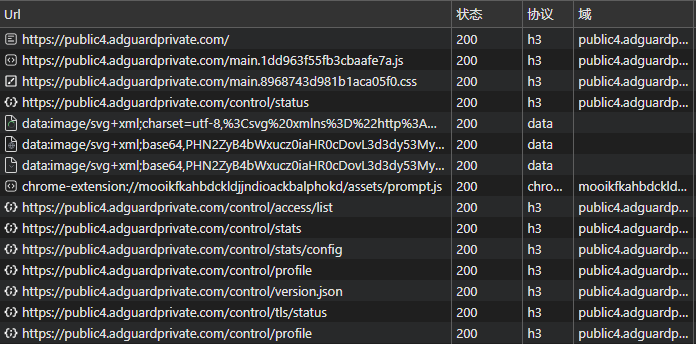
In-depth Technical Analysis of HTTP/3
As the latest version of the HTTP protocol, HTTP/3 brings multiple revolutionary technical advantages based on Google’s QUIC transport protocol:
Core Features
QUIC Protocol over UDP
- Significantly reduces connection establishment time
- Improved multiplexing capabilities
- Smarter packet loss handling mechanisms
Optimized Performance
- Zero round-trip time (0-RTT)
- Enhanced congestion control
- Connection migration support
Enhanced Security
- Integrated TLS 1.3
- Encrypted handshake process
- Reduced risk of man-in-the-middle attacks
Connection Establishment Comparison
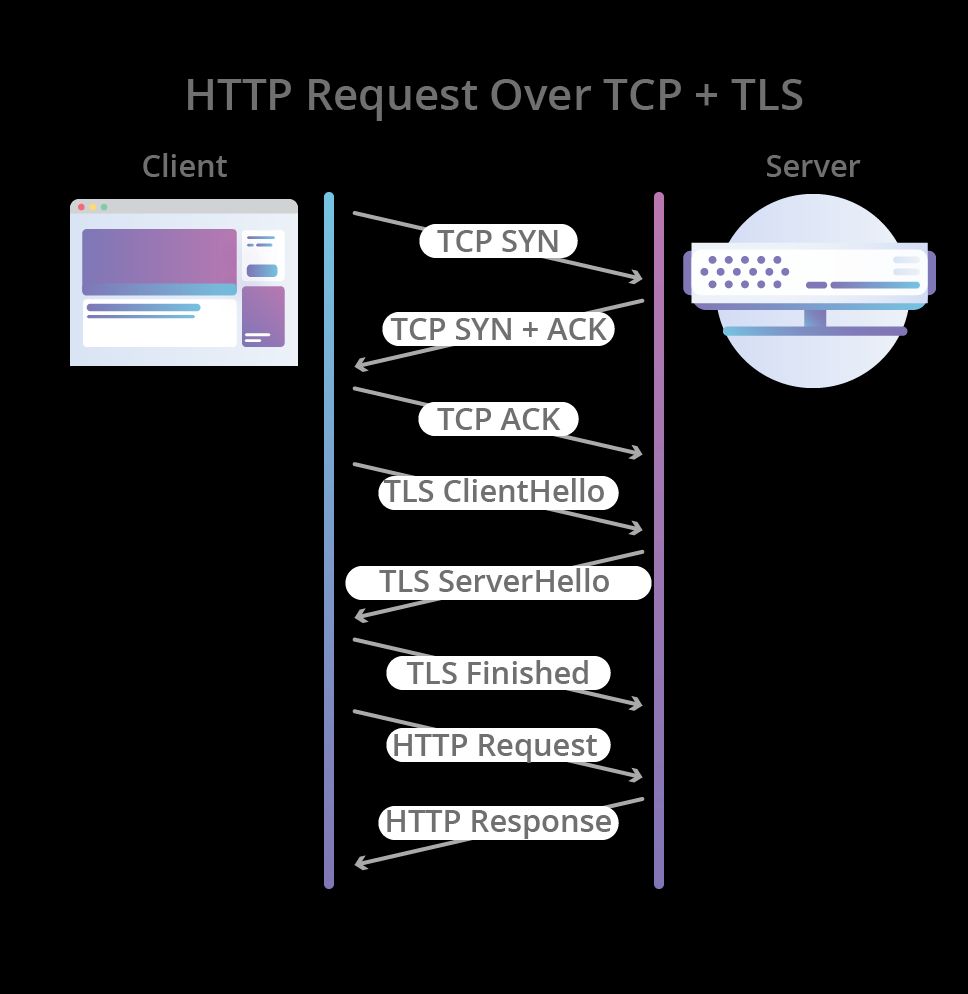
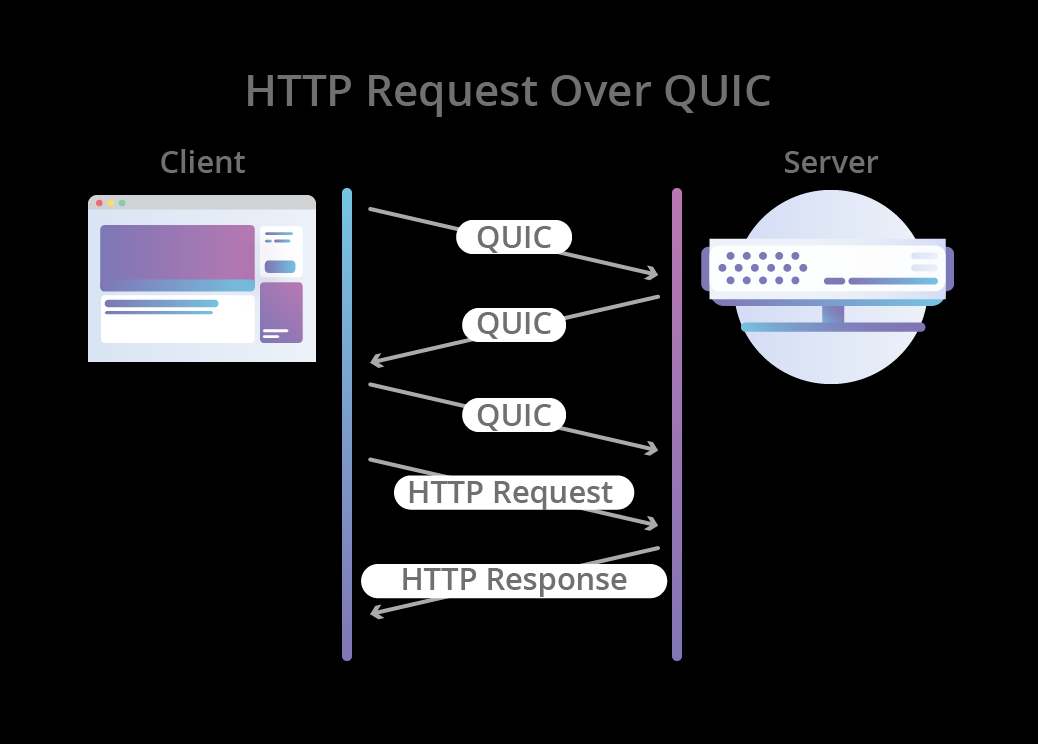
Usage Recommendations
- Ensure your client supports HTTP/3 protocol
- Keep client software updated
- System will automatically downgrade to HTTP/2 in restricted network environments
Important Considerations
- Some regional networks may restrict UDP traffic, affecting HTTP/3 performance
- Performance may vary across different network environments
- System automatically selects optimal protocol based on network conditions
Reference Materials
Introducing Custom Client Name Feature
Feature Overview
To enhance user experience, NullPrivate now supports custom client naming. This feature enables you to set unique identifiers for different devices, making device management more intuitive and convenient.
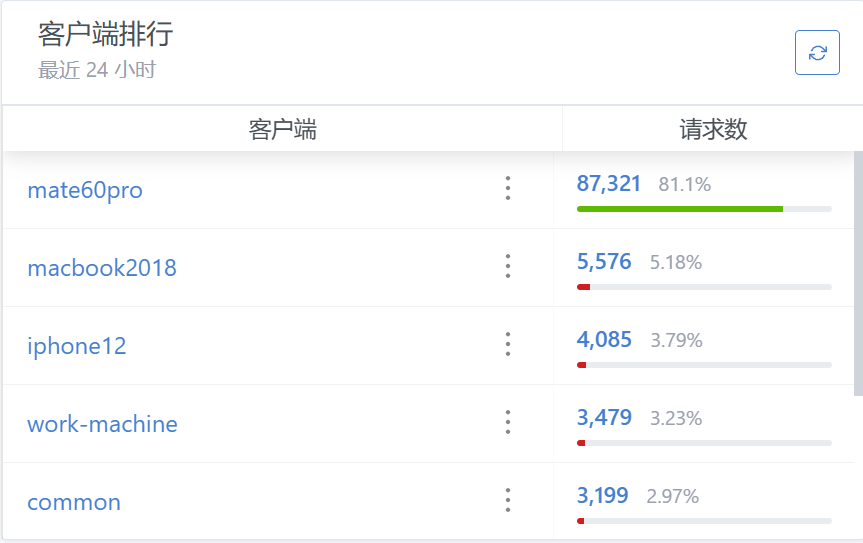
Configuration Guide
Configuration methods vary slightly depending on device type:
Android Devices
Simply add a custom prefix before the domain name using this format:
{device-name}.{original-domain}
Example: xiaomi-15pro.xxxxxxxx.nullprivate.com
iOS Devices
- Navigate to the “Setup Guide” page
- Enter your custom name in the “Client ID” field
- Download and apply the new configuration profile
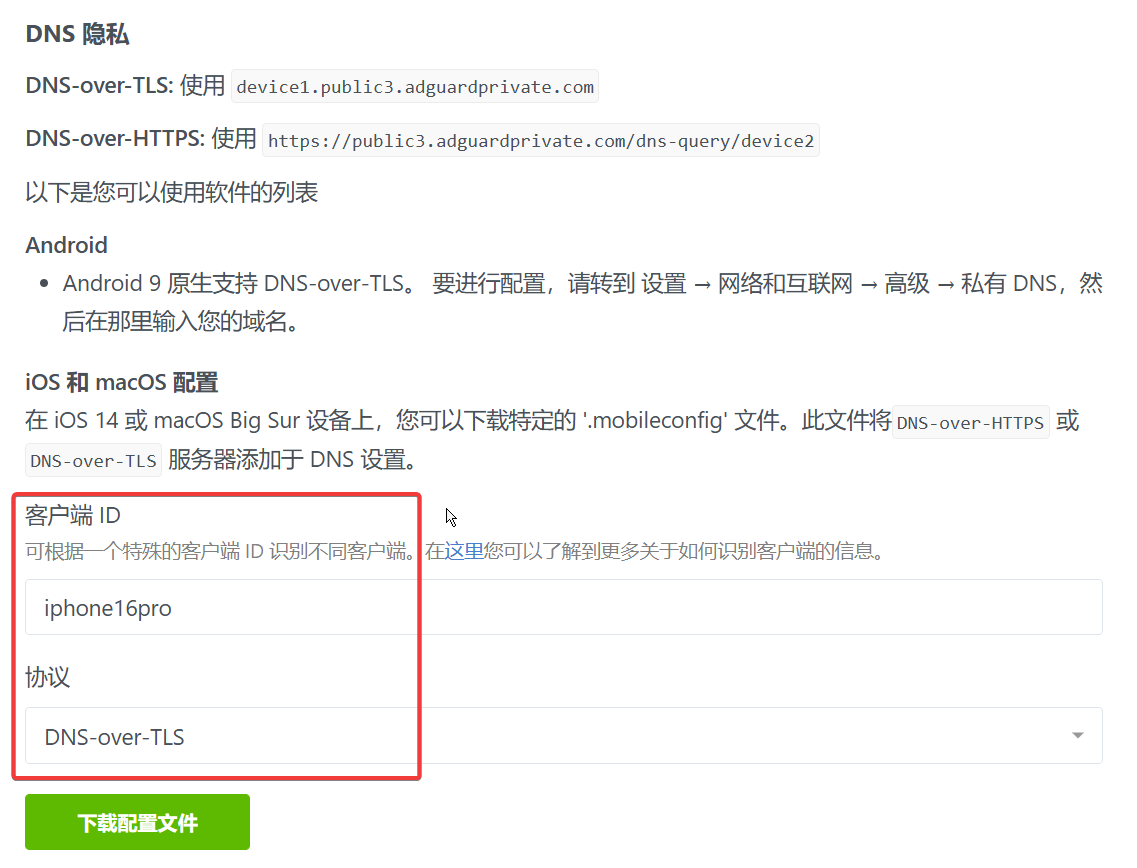
Browser Configuration (DoH)
Add custom identifiers after the original DoH address:
Original format:
https://xxxxxxxx.nullprivate.com/dns-query
New format:
https://xxxxxxxx.nullprivate.com/dns-query/{device-identifier}
Example: https://xxxxxxxx.nullprivate.com/dns-query/pc1-browser
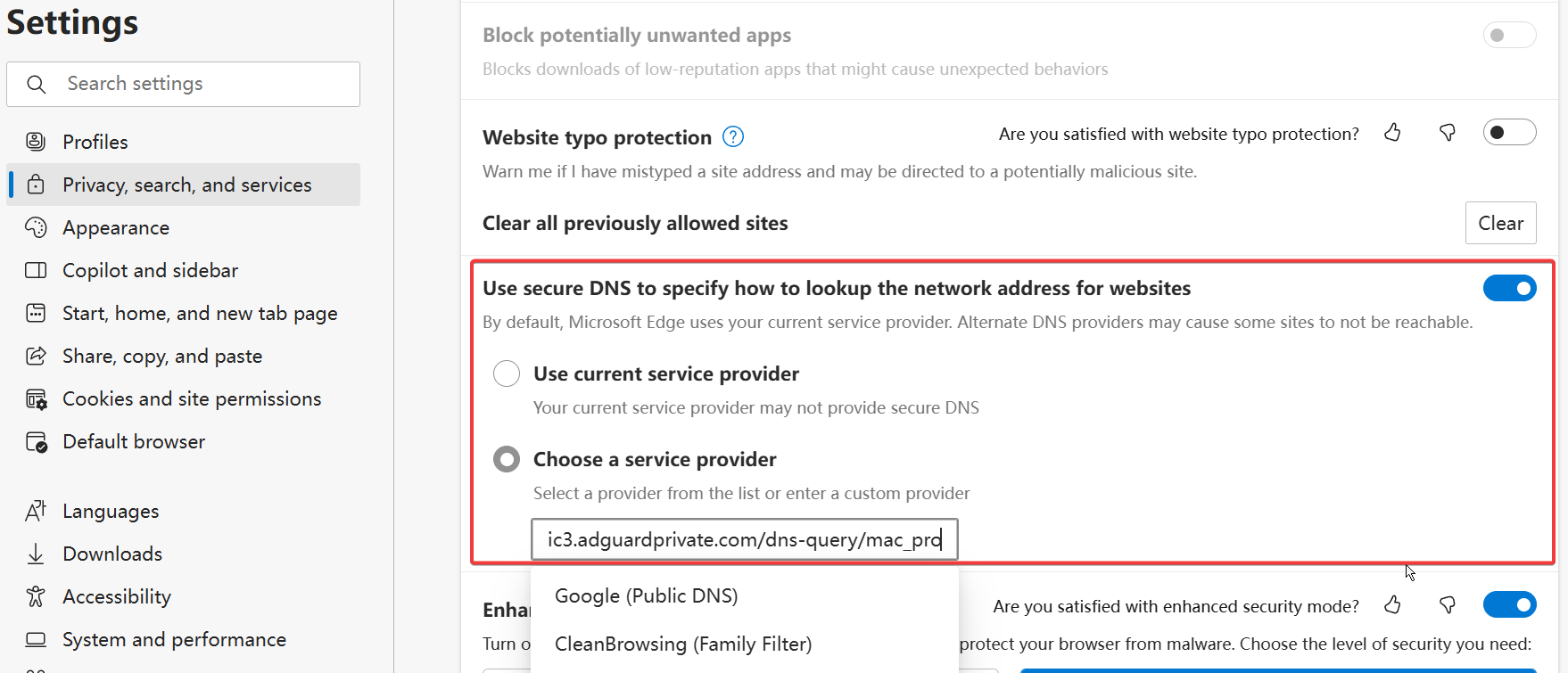
Usage Recommendations
- Use meaningful identifiers like device model, location, or purpose
- Avoid special characters - use letters, numbers, and hyphens
- Maintain consistent naming conventions for easier management
Important Notes
- Custom names only affect display and won’t impact service performance
- Configuration must be reapplied after name changes take effect
- We recommend saving device configuration details for future reference
The Necessity of Ad Blocking: Safeguarding Attention and Privacy in the Digital Age
Deconstructing the Modern Advertising Ecosystem
The Advertiser Profit Model
The contemporary advertising system rests on a complex chain of interests:
- Advertisers connect marketers and users through media platforms
- Revenue comes from marketers’ placement fees, not from users
- The goal is to maximize “conversion rates”—turning ad viewers into paying customers
The Battle for Conversion
In this war for attention:
- Higher conversion rates translate into higher ad prices
- Ad-delivery efficiency directly affects revenue
- “Personalized targeting” has become the core strategy for boosting conversions
The Truth Behind Personalized Ads
The Depth of Data Collection
Modern ad systems harvest user information through multiple channels:
- Device identifiers and operating-system data
- Cross-platform behavioral tracking
- Social-relationship network analysis
- Consumer-habit profiling
The Trap of Precise Targeting
Seemingly convenient personalized feeds hide real risks:
- Exploiting cognitive biases to manufacture demand
- Amplifying latent user anxieties
- Creating false urgency
How Advertising Erodes Attention
The Cost of the Attention Economy
- Frequent interruptions undermine productivity
- Distorts decision-making ability
- Increases cognitive load
- Blurs the boundary of genuine needs
The Evolution of Ad Strategies
Modern advertising has moved beyond simple information delivery to:
- Forced memory implantation
- Emotional stimulation
- Anxiety marketing
- Social pressure
Strategies for Self-Protection
Core Protective Measures
Privacy First
- Restrict app permissions
- Control data sharing
- Use privacy-protection tools
Attention Management
- Set focused time blocks
- Build information-filtering mechanisms
- Cultivate the habit of actively seeking information
Consumption Decision Control
- Establish a needs-assessment system
- Delay purchase decisions
- Maintain rational judgment
Technical Support: Cyber Savvy
In this data-driven era, maintaining “cyber savvy”—caution and wisdom in the digital realm—is vital. This includes:
- Managing digital footprints
- Protecting personal privacy
- Controlling information flow
Solutions
“NingPing” is a comprehensive protection suite that goes beyond ad blocking to help users:
- Safeguard personal privacy
- Optimize browsing experiences
- Reduce attention fragmentation
- Provide a controllable information environment
Let’s reclaim our digital lives—starting by rejecting intrusive ads.
Service Resource Optimization Strategy Guide
Background
As user numbers grow and feature demands increase, we have observed that certain high-resource-consumption configuration options can lead to service instability. To ensure service quality, we conducted an in-depth analysis and formulated a corresponding optimization plan.
Resource Optimization Strategy
1. Filter Update Mechanism Optimization
Current Situation
- Some users have configured hourly filter updates
- Each update requires a full download-parse-deduplication cycle
- International bandwidth limitations prolong update times
- Server resources remain under continuous high load
Optimization Plan
We have adjusted the minimum update interval to 72 hours for the following reasons:
- Most filter lists update on a 24–72 hour cycle
- Reduces ineffective resource consumption
- Ensures service stability
- Improves bandwidth utilization efficiency
Impact Assessment
- Positive impacts
- More stable service response
- More reasonable resource usage
- Reduced system load
- Minimal impact
- Rule updates still occur within a reasonable cycle
- No effect on protection efficacy
2. Parallel Request Strategy
Current Situation
Most users currently have parallel requests enabled, but under the existing architecture the benefits are limited:
- Latency differences among Alibaba Cloud upstream services are typically within 5 ms
- May trigger Alibaba Cloud public service request-rate limits
- Adds unnecessary system overhead
Usage Recommendations
- We recommend using load-balancing mode
- Parallel requests are suitable for:
- Scenarios with significant upstream latency differences (>200 ms)
- Cases of unstable service quality
- Cross-border access scenarios
Note: We have not yet observed any throttling issues caused by parallel requests, so this feature remains available for now.
3. Third-Party List Management
Security Considerations
To ensure system stability, we have temporarily disabled support for certain third-party lists:
- External list sizes are unpredictable
- May lead to resource overruns
- Service stability cannot be guaranteed
Future Plans
We are researching a safer third-party list management solution so that this feature can be re-enabled in the future.
Basic Memory Limit Adjustment
Some users’ environments restart frequently; checking the logs shows the exit reason is memory usage hitting the 300 MB limit, causing a forced shutdown.
We are now raising the per-container limit to 500 MB to alleviate the restart issue.
If your environment experiences login or restart problems, please don’t hesitate to contact us at any time—solving customer issues is our responsibility.
Need help?
Contact on WeChat
private6688
or
Send email
[email protected]
Please describe your issue in detail, and we will respond as soon as possible.
Always Here to Support You
Quick Start Guide
To help you get up and running with our service as smoothly as possible, we’ve prepared a detailed User Guide.
Thoughtful Support Service
Personalized Guidance
We understand that new users may face challenges when first getting started. Therefore, we:
- Continuously refine the structure of our product documentation
- Provide clear configuration guides
- Have prepared an extensive FAQ
Timely Response
While we employ a registration-free system to protect user privacy, that does not compromise the support we provide. You can reach us through the following channels:
Need help?
Contact on WeChat
private6688
or
Send email
[email protected]
Please describe your issue in detail, and we will respond as soon as possible.
How to Set Up a Dedicated Link
Some paid AdGuard Home services provide a dedicated link but do not allow users to access the admin panel; the provider manages the rules on their behalf.
This indicates that they do not offer a private admin backend; the service is simply delivered through a domain-based reverse proxy, keeping costs relatively low.
You need to rent a server to run AdGuard Home and configure an Nginx reverse proxy to achieve this functionality.
Taking the service link 5r69hxdx9onl70hp.example.com as an example, the key Nginx configuration is as follows:
http {
  server {
    listen 1080;
    server_name 5r69hxdx9onl70hp.example.com;
    location / {
      proxy_pass http://worker.example.com:5002;
      proxy_set_header Host $http_host;
    }
  }
  server {
    listen 1443 ssl;
    server_name 5r69hxdx9onl70hp.example.com;
    ssl_certificate /app/data/certs/5r69hxdx9onl70hp/fullchain.pem;
    ssl_certificate_key /app/data/certs/5r69hxdx9onl70hp/privkey.pem;
    location / {
      proxy_pass https://worker.example.com:5003;
      proxy_set_header Host $http_host;
    }
  }
}
stream {
  ssl_protocols TLSv1.2 TLSv1.3 SSLv3;
  map $ssl_preread_server_name $targetBackend {
    5r69hxdx9onl70hp.example.com worker.internal.com:5004;
  }
  server {
    listen 1853;
    proxy_pass $targetBackend;
    ssl_preread on;
  }
}
For each paying user you only need to add one similar Nginx block and point the domain’s DNS to the server. When the number of users grows and load on a single application instance becomes high, you can proxy to different back ends.
Such services cannot achieve true personalization; users must be able to enter the admin panel to truly control their own browsing data. This is the advantage of our private service—each user truly has an exclusive instance and can use all NullPrivate features.
All-new Upgrade – Enhanced Ad-blocking Rules
Rule Update Notes
To meet users’ demand for more robust ad blocking, we’ve completely overhauled our filtering rule strategy. The new version significantly improves ad-filtering effectiveness while keeping false-positives low. This update stems from user feedback; on the premise of ensuring normal website access, we have added more precise interception rules.
Rule List Overview
We have compiled the following professional rule lists; you can choose the ones that fit your needs:
Basic Protection Rules
| Category | AdGuard | Description |
|---|---|---|
| Ad Blocking | Link | Comprehensive filtering of all ad servers and ad sites |
| Tracking Protection | Link | Stops user-behavior tracking and personal-data collection |
| Redirect Protection | Link | Prevents malicious URL redirects |
Content Filtering Rules
| Category | AdGuard | Description |
|---|---|---|
| Fraud Sites | Link | Websites designed to deceive users |
| Ads | Link | Ad servers and advertising websites |
| Cryptocurrency | Link | Cryptocurrency and mining-related sites May affect legitimate crypto sites |
| Drugs | Link | Illegal drug sites Includes prescriptions illegal to possess in the US |
| Everything | Link | All domains from non-test lists combined |
| Link | Blocks FB and associated services | |
| Fraud | Link | Fraudulent sites |
| Gambling | Link | All gambling sites—legal and illegal |
| Malware | Link | Known malware-hosting sites |
| Phishing | Link | Sites used for phishing |
| Piracy | Link | Known illegal download sites |
| Porn | Link | Pornographic or porn-promoting sites |
| Ransomware | Link | Known ransomware hosts or sites containing ransomware |
| Redirect | Link | Sites that redirect you from where you expected to go |
| Scam | Link | Sites aimed at scamming users |
| TikTok | Link | Blocks TikTok and related services |
| Torrent | Link | Torrent indexes May block legitimate trackers distributing open-source software |
| Tracking | Link | Sites dedicated to tracking and gathering visitor information |
Usage Recommendations
Step-by-Step Adoption
- Start with the basic protection rules
- Gradually add other rules as required
- Review and update lists periodically
Performance Optimization
- Avoid enabling too many rules at once
- Prioritize the rules most relevant to your needs
- Clean up unused rules on a regular basis
Troubleshooting
- Record and report false-positives promptly
- Temporarily disable a specific rule for testing
- Utilize custom whitelists when necessary
Notes
- Certain rules may affect normal access to some sites
- We recommend checking for rule updates regularly
- If frequent false-positives occur, please contact us immediately
For users who need more flexible control, we offer a Pro service that supports fully custom rule configuration. Should you have any questions, feel free to reach out.
Need help?
Contact on WeChat
private6688
or
Send email
[email protected]
Please describe your issue in detail, and we will respond as soon as possible.
Trial Service Details
As a provider focused on delivering custom ad-filtering rules, we understand the considerations users have when choosing a service. Although our operating costs are high, we remain committed to giving users maximum customization flexibility.
To let you fully appreciate the value of our service, we’ve launched an exceptional trial plan. This version includes all premium features and is identical to the paid service, allowing you to experience the unique advantages of customized filtering with zero risk.
Trial notes:
- The discounted price is available only for first-time use
- Renewals require selecting a paid service plan
- Thanks to our account-free design, the trial can be purchased repeatedly
- Each new purchase creates a completely fresh service instance
- Renewals preserve all existing configurations of the original instance
We look forward to your experiencing this premium service. If you encounter any issues during use, our support team is ready to provide professional assistance at any time.
Need help?
Contact on WeChat
private6688
or
Send email
[email protected]
Please describe your issue in detail, and we will respond as soon as possible.