Thank you for choosing NullPrivate! We are always committed to providing you with the best service:
Feel free to share your experience and suggestions with us at any time
We put privacy protection first
No registration required; we do not collect phone numbers or email addresses
No marketing interruptions of any kind
Need help?
Contact on WeChat
private6688 or
Send email
[email protected] Please describe your issue in detail, and we will respond as soon as possible.
1 - How to Purchase and Use
Purchase and Usage Guide: Choose a plan, complete payment, activate dedicated encrypted DNS (DoT/DoH), and quick configuration paths across platforms.
Purchase and Usage
2 - iOS Device Reset Settings
This article explains how to reset DNS settings on iOS devices
If you encounter false blocking issues on iOS devices, you can restore original DNS settings through the following two methods.
Option 1: Temporarily Disable DNS Encryption
This method is suitable for temporarily testing whether issues are caused by DNS settings:
Open the Settings app
Go to General > VPN & Device Management
Find the DNS option under Access Restrictions & Proxy
Select Automatic to temporarily restore system default settings
Option 2: Complete Configuration Removal
To completely remove DNS encryption settings:
Open the Settings app
Go to General > VPN & Device Management
Find public.adguardprivate.com DoT under Configuration Profiles
Tap Remove Profile and confirm
If you decide to permanently stop using NullPrivate, it must mean our service has caused you inconvenience. We sincerely apologize for any inconvenience caused. Our public service uses popular blocking rules. Due to limited resources, we cannot track all cases of under-blocking or over-blocking for every app. If you wish to customize rules for personalized needs, consider purchasing private service. Our private service offers dedicated solutions at exceptional value to meet various requirements.

Configuration Demo
3 - How to Handle False Blocking
This guide explains how to handle false blocking issues, including temporarily disabling protection, adding services to the whitelist, and temporarily suspending services.
Some services are considered necessary by some users but viewed as personal information collection or advertising by others. For example, WeChat and Alipay may contain small programs that mix services with ads, making them unusable. Payment redirects such as parking lots or vending machines may also fail to function properly.
If strict blocking rules are set, these services may be blocked, causing service disruptions.
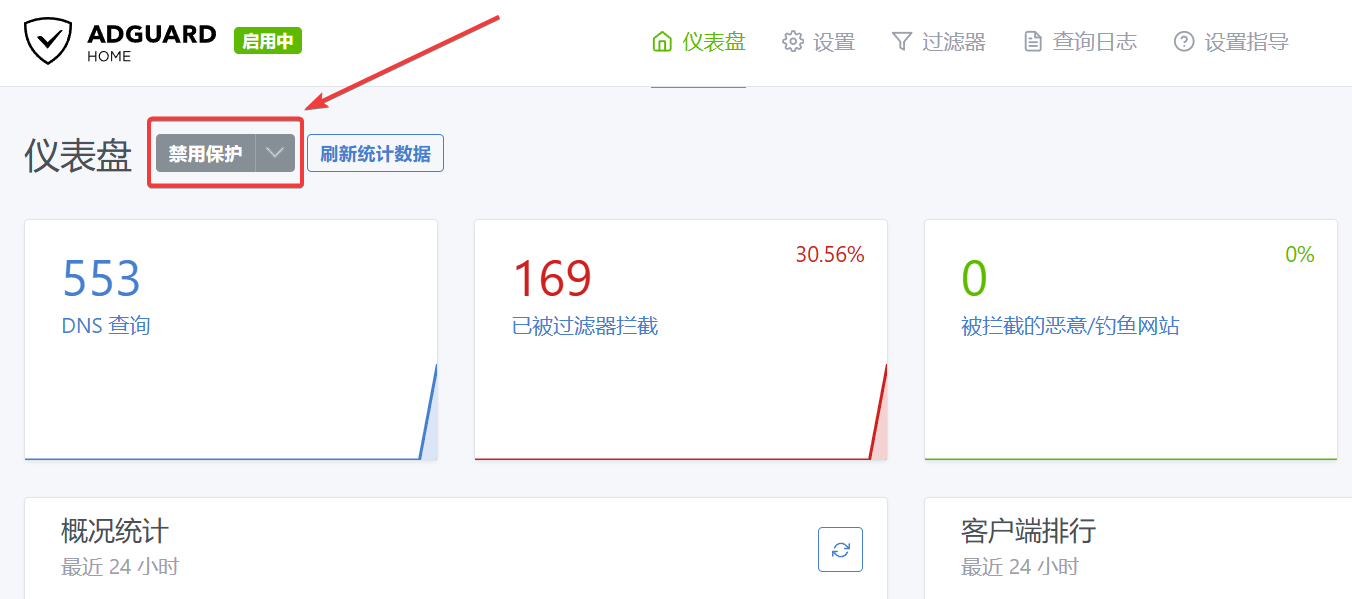
Temporarily Disable Protection
If you need an urgent, temporary solution, you can resolve the issue by temporarily disabling protection, which typically takes effect within 10 seconds.
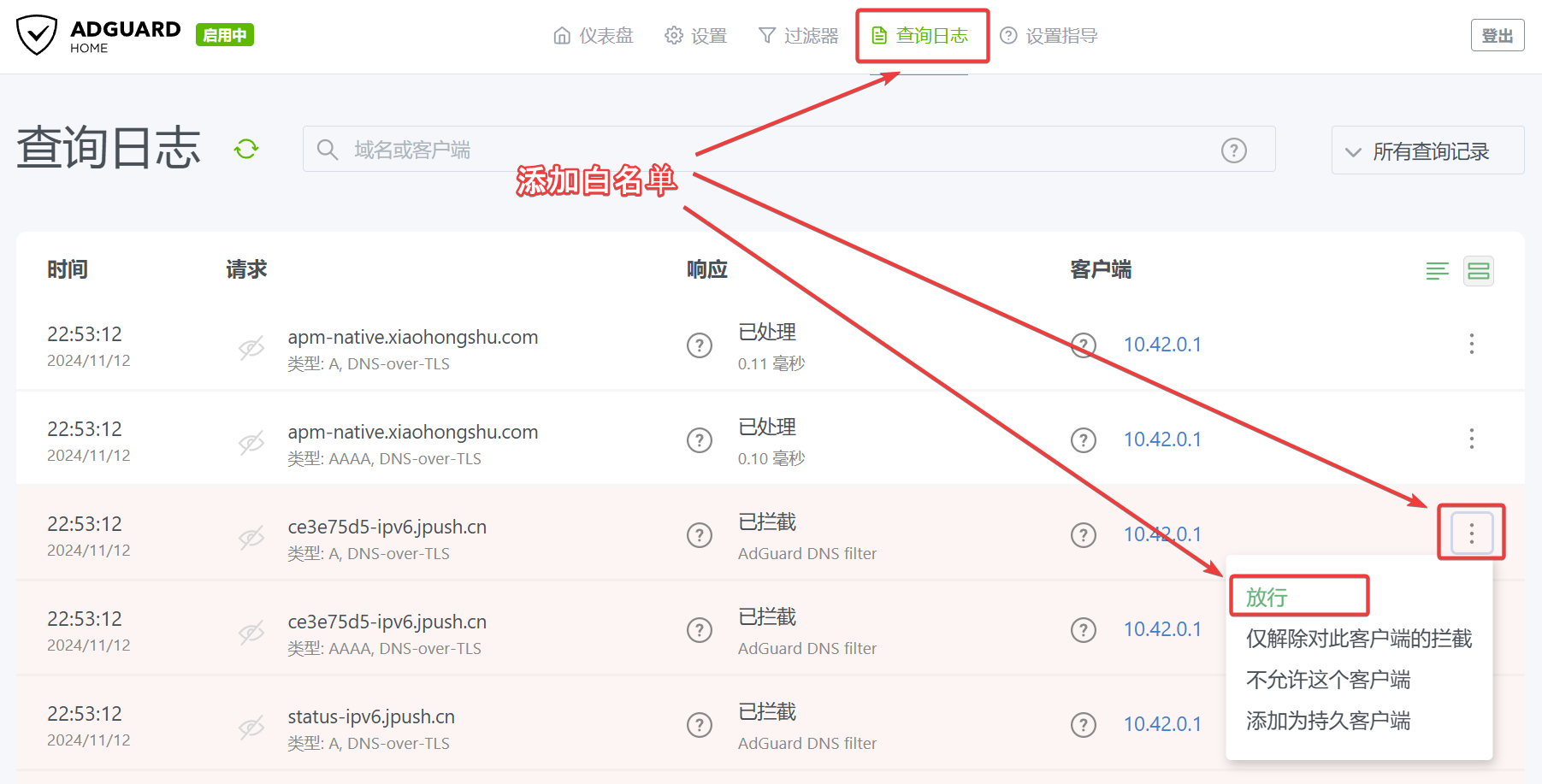
Add Service to Whitelist
For services used long-term, you can add them to the whitelist to prevent future blocking. This usually takes effect within 10 seconds.
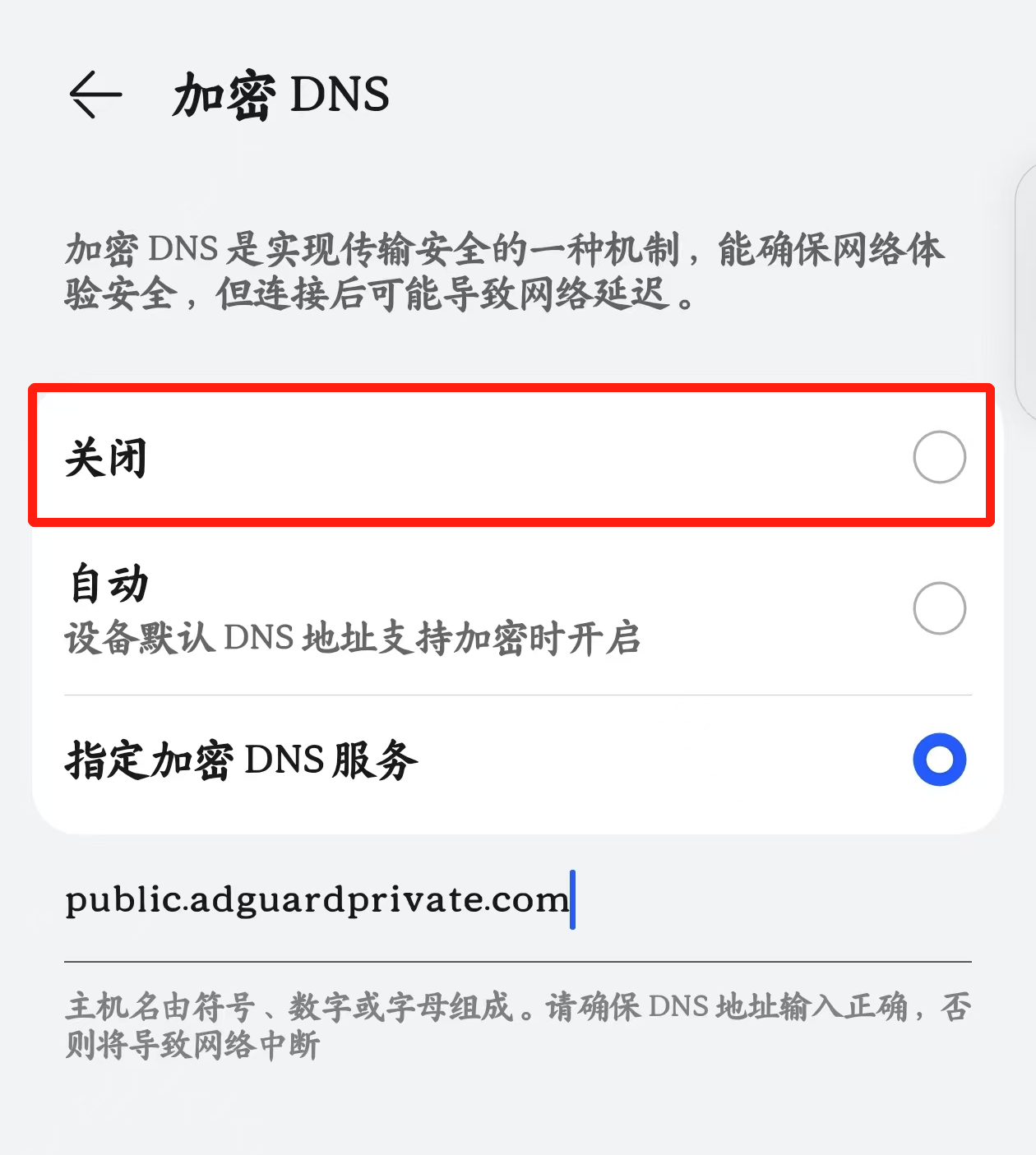
Temporarily Suspend Settings
Public service users can resolve the issue by temporarily suspending the service, which typically takes effect within 60 seconds.
4 - After-Sales Service Guide
Learn about the after-sales support options for “NingPing,” including technical consultation and troubleshooting services.
Service Features
We adopt a no-registration design to protect user privacy:
No account registration required
No personal information collected
Service credentials provided immediately after payment
This article explains solutions when encountering access issues with mini programs, providing three approaches: temporarily disabling protection, adding services to whitelist, and temporarily deactivating settings.
If your blocking rules are set too strictly, they may intercept some legitimate services, causing operational exceptions.
Temporarily Disable Protection
If you need an urgent, temporary solution, you can resolve it by temporarily disabling protection, which typically takes effect within 10 seconds.
Add Service to Whitelist
For services used long-term, you can add them to the whitelist to prevent future interception, which typically takes effect within 10 seconds.
Temporarily Disable Settings
Public service users can resolve issues by temporarily deactivating the service, which typically takes effect within 60 seconds.
6 - Slow Access to Some Websites
Analysis and solutions for slow access to certain websites when using NullPrivate DNS, mainly related to ECS (Extended Client Subnet) support
Slow Access to Some Video Sites
If you experience slow access to certain websites while using NullPrivate, it may be due to the following reasons:
ECS Support:
NullPrivate’s free tier does not support ECS (Extended Client Subnet). ECS is a DNS protocol extension that allows DNS servers to provide more accurate responses based on the client’s network location. Many CDNs (Content Delivery Networks) use ECS to direct users to the nearest server, thereby improving speed. The free servers are located in Shanghai and Hangzhou.
Impact:
Slower Speeds: Without ECS, NullPrivate may be unable to direct you to the optimal CDN server, resulting in slower speeds.
Inaccurate Geolocation: You may be routed to a server far from your actual location, increasing latency.
Solutions:
Upgrade to Paid Plan: NullPrivate’s paid plans support ECS, which can resolve this issue and improve speed.
Use Another DNS Server: You can try another DNS server that supports ECS.