Feature Description
NullPrivate - Professional ad-blocking and privacy-protection solution
Product Overview
NullPrivate is a powerful network ad-blocking tool focused on providing comprehensive network privacy protection and content-filtering services. With advanced filtering technology, it helps users achieve a safer, faster, and cleaner web-browsing experience.
Core Features
Please use the left-hand table of contents to view detailed instructions for each feature.
1 - Web Ad Blocking
NullPrivate effectively blocks web ads through intelligent analysis and filtering technology, providing a cleaner browsing experience. It not only significantly improves webpage loading speed but also reduces bandwidth consumption and protects your online privacy.
Basic Principles of Ad Blocking
“NullScreen” employs DNS filtering technology to monitor and analyze network requests in real-time. When detecting ad-related domain requests, the system automatically returns a null address or local loopback address, effectively blocking ad content loading. This method is both efficient and transparent to users, without affecting normal browsing experience.
Intelligent Blacklist System
NullPrivate adopts a multi-level blacklist management mechanism:
- Automatic Updates: The system regularly fetches the latest ad domain lists from trusted sources
- Category Management: Classifies domains into different categories such as ads, trackers, and malware
- Performance Optimization: Uses efficient matching algorithms to ensure quick responses
- Statistical Analysis: Provides detailed blocking statistics to help
2 - Mobile Ad Blocking
Effectively block ads in the mobile OS and apps, boosting device performance and user experience
Problem Overview
Many Android devices ship with pre-installed adware that:
- Pops up ads at inappropriate moments
- Continuously collects user data in the background
- Consumes system resources, causing performance degradation
- Generates unnecessary network traffic
- Significantly shortens battery life
AdGuard Solution
“NingPing” protects your device by:
- Blocking network requests from adware
- Preventing malicious tracking
- Optimizing device performance
- Extending battery life
- Reducing mobile data usage
3 - Privacy Protection
Intercept privacy leakage requests to protect user privacy.
The Relationship Between Privacy and Advertising
Advertisers’ revenue primarily comes from ad conversions. To improve conversion rates, platforms need to:
- Increase user retention
- Deliver personalized ads
This requires collecting vast amounts of user privacy data. Platforms circumvent legal restrictions through:
- Complex user agreements
- Data exchanges with partners
- Disguised data anonymization
Priority of Privacy Protection
Privacy protection is more important than mere ad blocking:
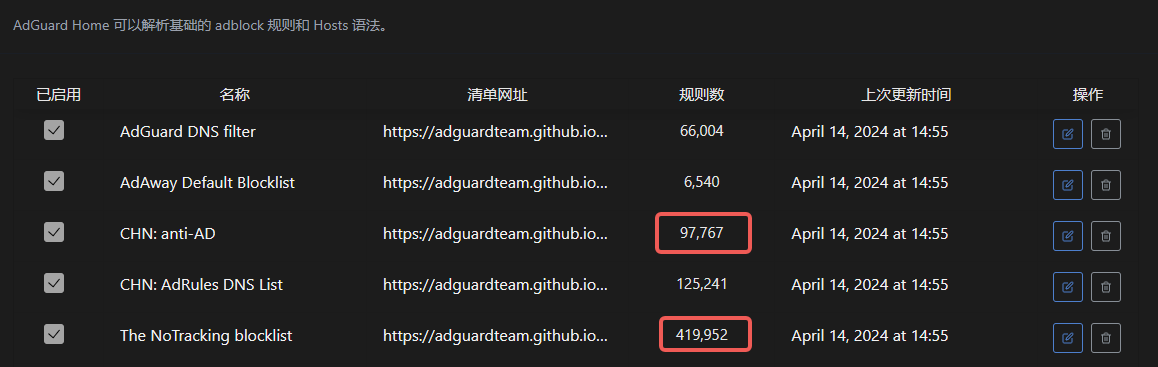
- AdGuard’s Chinese region tracking blocking rules (>400,000) far exceed ad rules (<100,000)
- Some platforms generate more revenue through privacy data despite having fewer ads
So-called personalized recommendations often don’t truly understand user needs, but rather serve as marketing strategies:
- “You might like this” actually means “We want to sell this”
- Seemingly thoughtful services mask continuous data collection
How to Protect Yourself
Learn “cyber discretion” – control privacy leaks to avoid accurate profiling by platforms. AdGuard Private Service can help you achieve this goal.
4 - Malware Blocking
Intercept malware through multi-layer protection mechanisms to safeguard devices and data security
What is Malware?
Malware is a category of software designed to damage or gain unauthorized access to computer systems. It may:
- Steal personal information and sensitive data
- Disrupt system functions and files
- Encrypt data for ransom
- Recruit devices into botnets
How Malware Spreads
Hackers typically spread malware through the following methods:
- Download links disguised as legitimate software
- Attachments in phishing emails
- Vulnerable websites
- Infected advertisements
How AdGuard Protects You
“NingPing” provides comprehensive malware protection:
- Blocks known malware download links
- Prevents communication between malware and command-and-control servers
- Identifies and stops suspicious data exfiltration
- Regularly updates malware signature databases
It is recommended that you also adopt additional security measures, such as keeping your system and software up to date and exercising caution when downloading and opening attachments.
5 - Adult Content Blocking
“NullPrivate” provides powerful adult content filtering, using intelligent recognition and blocking mechanisms to effectively shield against inappropriate content, creating a safe network environment for families and enterprise users.
Feature Overview
“NullPrivate” employs a multi-layer content filtering mechanism that can effectively identify and block:
- Pornographic and adult content sites
- Violent content
- Gambling-related sites
- Other harmful information
How It Works
The system achieves content blocking through:
- DNS-level blocking: Prevents domain resolution of known harmful sites
- Intelligent categorization: Classification system based on multiple trusted data sources
- Real-time updates: Regularly updated blocking rules to ensure protection effectiveness
Configuration Guide
Basic Settings
Add the blocklist Link to the filter blacklist
Advanced Options
- Custom rules: Add specific sites to the blocklist
- Exception management: Set up whitelists to avoid false positives
- Access logs: View blocking records
Application Scenarios
- Family protection: Create a safe browsing environment for minors
- Enterprise management: Ensure employee access to work-appropriate sites
- Public spaces: Suitable for public networks in libraries, schools, etc.
Notes
- Recommended to use in conjunction with anti-addiction features
- Regularly check and update filtering rules
- If false positives occur, promptly add to whitelist
- If circumvention is detected, submit feedback
6 - Social Network Blocking
Protect your online privacy by blocking social network trackers and embedded components
Risks of Social Network Tracking
Social network platforms collect user data through various means:
- Social plugins and share buttons
- Embedded content and widgets
- Third-party cookies and trackers
- Cross-site user behavior analysis
How AdGuard Protects You
“NingPing” safeguards your privacy by:
- Blocking social media trackers
- Preventing unauthorized data collection
- Filtering social network ads
- Stopping user profiling analysis
Recommended Usage
- Enable the social network filter
- Regularly check the blocking log
- Set up a whitelist as needed
- Keep filtering rules updated
With these measures, you can continue using the core features of social networks while protecting yourself from unwanted tracking and data collection.
7 - Phishing Site Blocking
Blocks phishing site requests, safeguards users’ personal assets, and provides all-around network security protection.
What is a phishing site?
A phishing site is a fraudulent website that masquerades as a legitimate one in order to obtain sensitive information such as personal details and account passwords. These sites usually imitate:
- Banks and payment platforms
- Social networks
- E-commerce sites
- Government agency websites
Main risks
- Stealing user accounts and passwords
- Pilfering bank card and payment information
- Spreading malware
- Causing personal privacy leaks
- Leading to financial loss
How AdGuard protects you
“NingPing” offers protection through:
- Real-time URL safety checks
- Blocking known phishing sites
- Preventing malicious domain resolution
- Providing safe-browsing alerts
Safe-usage recommendations
- Enable AdGuard’s phishing protection
- Pay attention to the authenticity of the URL
- Do not click links from unknown sources
- Regularly update the AdGuard rule database
8 - Tracking Protection
Block tracking requests to fully protect user privacy and enhance the browsing experience.
What is Tracking?
Tracking is the practice of websites and applications collecting user data. Common tracking methods include:
- Cookie tracking
- Tracking pixels
- Browser fingerprinting
- Device identifier collection
- Behavioral analysis scripts
Impact of Tracking
Tracking activities have the following negative effects:
- Violate user privacy by exposing personal behavioral data
- Increase network traffic consumption
- Reduce device battery life
- Slow down webpage loading speeds
How AdGuard Protects You
“NingPing” fully protects your privacy by:
- Intelligently identifying and blocking tracking requests
- Preventing third-party cookies
- Removing tracking parameters
- Blocking common analytics scripts
By using AdGuard, you can enjoy a safer, faster, and more energy-efficient web experience.
9 - Malicious Traffic Interception
Prevent malicious traffic hijacking and content tampering through encrypted DNS and traffic protection, ensuring secure network access
Malicious Traffic Interception
Problem Background
In daily internet usage, you may encounter the following security risks:
- ISP DNS hijacking that redirects you to fake websites
- Public WiFi hotspots injecting advertising content
- Man-in-the-middle attacks tampering with web content
- Unencrypted traffic being monitored and hijacked
Solution
Through the following technical means, we can effectively protect against these threats:
- Enable encrypted DNS queries
- Use HTTPS encrypted connections
- Establish private secure channels
- Real-time monitoring of abnormal traffic
These protection measures can ensure your network access is safe and reliable, preventing various malicious hijacking and content tampering.
10 - Access Request Logs
Through detailed request logs and statistical data, help you comprehensively understand and manage network traffic.
Complete Access Request Logs
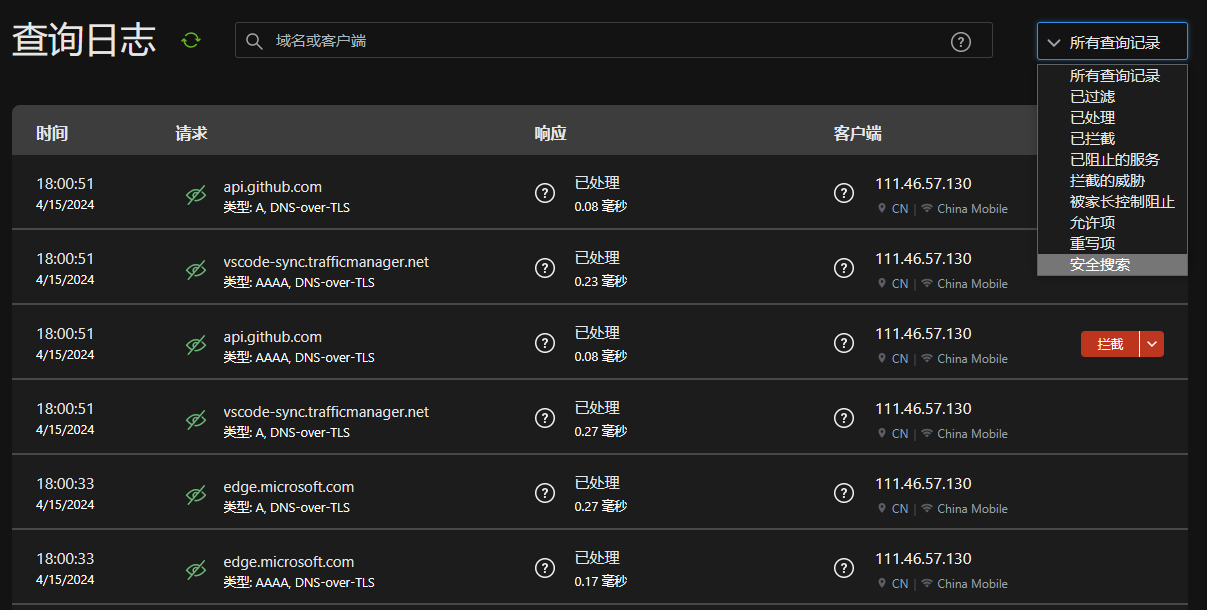
Access request logs provide the following detailed information:
- Time: The specific time when the request occurred
- Client: The IP address of the device initiating the request
- Request Target: The domain name or IP address being accessed
- Response Status: The processing result of the request
- Filter Rule: The triggered filter rule (if any)
You can use the search box to filter logs by domain name, IP, or rule name. Logs are retained for 3 days by default.
Top Requested Domains
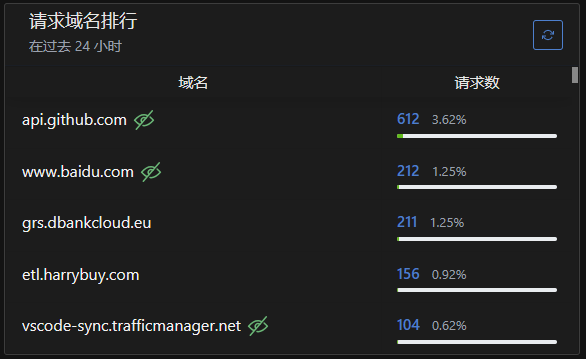
Domain access statistics display:
- Most frequently accessed domains
- Request count per domain
- Generated upstream/downstream traffic
- Last access time
Supports sorting by request count or traffic volume to help identify high-frequency accessed websites.
Top Blocked Domains
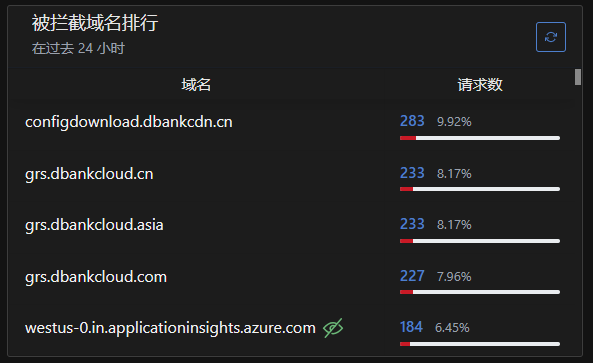
Blocking statistics show:
- List of blocked domains
- Block count statistics
- Triggered filter rules
- Last blocking time
You can directly perform in the list:
- Add mistakenly blocked domains to whitelist
- View specific rules causing blocks
- Export statistical data for analysis
11 - Statistics
Comprehensive DNS query statistical analysis to help you understand network usage.
DNS Query Statistics
AdGuard private service provides detailed DNS query statistical analysis to help you better understand network usage.
Top Requested Domains
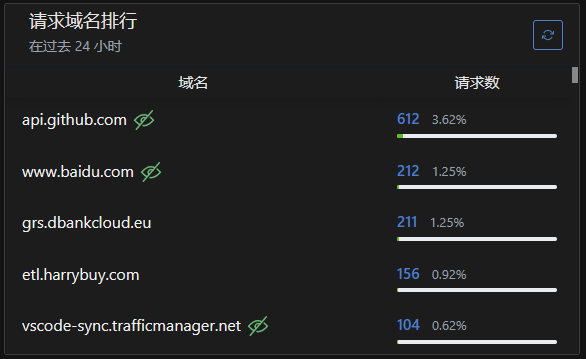
Statistics include:
- Domain access frequency statistics
- Request count per domain
- View trends by time period
- Support search and filtering
Blocking Records Analysis
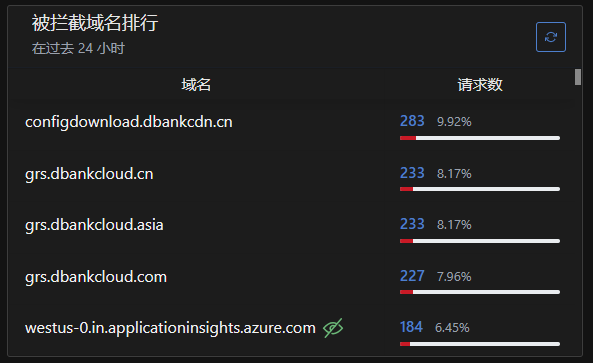
Detailed display:
- List of blocked domains
- Blocking rule matching details
- Blocking reason explanations
- Blocking time records
Data Applications
Statistical data helps you:
- Identify potential security threats
- Optimize ad filtering rules
- Analyze network usage habits
- Adjust network access policies
12 - Supported Platforms
“NingPing” supported platforms and configuration guide
Supported Protocols
“NingPing” supports the following encrypted DNS protocols:
- DoT (DNS over TLS) - DNS queries encrypted via TLS
- DoH (DNS over HTTPS) - DNS queries encrypted via HTTPS
Windows 11
- Supports system-level DoH configuration
- Configure via Settings -> Network & Internet -> DNS server
macOS (Big Sur and above)
- Supports system-level DoH/DoT configuration
- Can be configured via System Preferences -> Network
iOS (14.0 and above)
- Supports system-level DoH/DoT configuration
- Can be configured in Settings -> General -> VPN & Device Management
Android (9.0 and above)
- Supports system-level Private DNS (DoT)
- Configure in Settings -> Network & Internet -> Private DNS
Browser Support
- Chrome/Edge/Brave: Supports DoH
- Firefox: Supports DoH/DoT
- Safari: Follows system DNS settings
For detailed configuration instructions, please refer to the specific configuration guides for each platform.
13 - Configuration Guide
Detailed configuration instructions for “Ning Screen”, including quick start, advanced settings, and FAQ.
Quick Start
“Ning Screen” adopts a “ready-to-use” design philosophy:
- Pre-configured optimized settings
- Intelligent rule management
- Automatic update maintenance
Configuration Methods
Secure Connection Options
Provides two secure encryption methods:
TLS Encryption
- Higher performance
- Suitable for mobile devices
- Supports DNS-over-TLS
HTTPS Encryption
- Broader compatibility
- Suitable for browsers
- Supports DNS-over-HTTPS
Device Configuration Guide
Browser Configuration
- Link:
https://xxxxxxxxxxxxxxxx.adguardprivate.com/dns-query/browser1 - Supports all major browsers
- No additional plugins required
Android Devices
- Server:
android1.xxxxxxxxxxxxxxxx.adguardprivate.com - Supports system-level configuration
- Compatible with third-party DNS apps
iOS Devices
- Provides dedicated configuration profile
- Supports system-level settings
- Automatically configures required parameters
Advanced Settings
Custom Rules
- Supports importing custom filtering rules
- Configurable rule priorities
- Supports regular expressions
- DNS cache settings
- Response timeout configuration
14 - Open Source Information
Transparent and verifiable privacy commitment: built on AdGuard Home, licensed under GPL-3.0, full source code and change logs are public for better security and auditability.
This project is inherited from an open-source project and follows the same open-source license GPL-3.0.
15 - Custom Rules
NullPrivate supports multiple custom rule formats, allowing flexible configuration to meet your needs.
NullPrivate supports multiple custom rule formats, allowing flexible configuration to meet your needs. Below are the commonly used rule formats and examples:
| Rule Format | Example | Description |
|---|
| Domain Block | ||example.org^ | Blocks example.org and all its subdomains |
| Allowlist | @@||example.org^ | Adds example.org and all its subdomains to the allowlist |
| DNS Redirect | 127.0.0.1 example.org | Resolves example.org to the specified IP |
| Comment | ! comment or # comment | Adds rule comments without affecting actual filtering |
| Regex | /REGEX/ | Matches domains using regular expressions |
Advanced Usage
- You can combine multiple rule types
- Rule priority: Allowlist > Blocklist > DNS Redirect
- Supports importing third-party rule lists
For detailed information, please refer to the AdGuard Home Hosts Blocklists documentation.
16 - Custom DNS Resolution
With custom DNS resolution, you can configure friendly domain names for LAN devices, simplifying network device management and enhancing user experience.
Feature Overview
Custom DNS resolution allows you to:
- Configure custom domain names for LAN devices
- Implement private domain name resolution
- Securely and conveniently access internal network services
Application Scenarios
Network Device Access
- NAS device:
nas.home → 192.168.1.100 - Router:
router.home → 192.168.1.1 - Printer:
printer.home → 192.168.1.200
Development & Testing Environments
- Local service:
api.local → 127.0.0.1 - Test environment:
test.local → 192.168.1.50 - Container:
redis.local → 172.17.0.2

Configuration Guide
Basic Syntax
Domain RecordType TargetAddress
home A 192.168.1.2
*.home A 192.168.1.2
Supported Record Types
A record: IPv4 address resolutionAAAA record: IPv6 address resolutionCNAME record: Domain alias
Security Features
- Only effective on configured devices
- Won’t expose internal IP addresses
- Supports wildcard domain configuration
- Takes effect immediately without restart
Usage Recommendations
- Choose intuitive domain naming
- Recommended to use
.home suffix - Track internal IP changes
- Regularly check resolution configurations
17 - Custom Block List
With the custom block list feature, you can precisely control network access and achieve personalized content filtering and ad blocking.
Feature Overview
Custom block lists provide:
- Precise domain blocking control
- Flexible rule import/export
- Real-time update mechanism
- Convenient list management interface
||example.com^
||ads.example.com^
Mainstream Subscription Sources
- AdGuard format
- HOSTS format
- Domain format
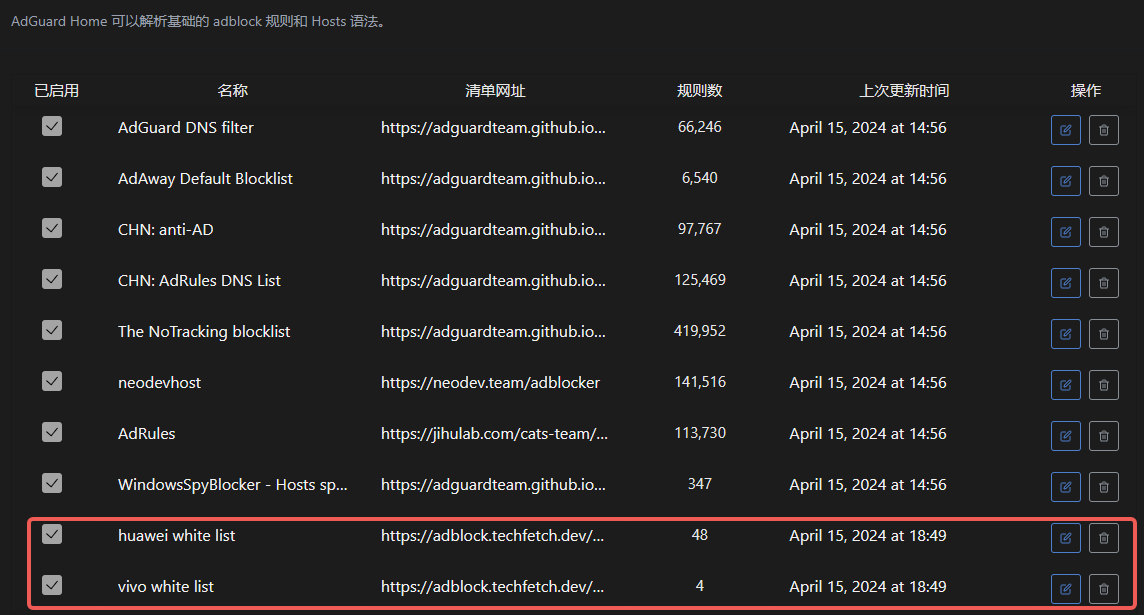
System Preset Lists
We offer the following optimized lists:
- Mobile Manufacturer Ads Blocking: Specifically targets brand-specific system ads
- General Ad Blocking: Covers common advertising networks
- Privacy Protection: Blocks trackers and data collection
Usage Recommendations
List Selection
- Add lists from trusted sources
- Avoid duplicate rules
- Regularly update rule sources
Performance Optimization
- Control list quantity
- Remove invalid rules
- Monitor blocking effectiveness
Troubleshooting
- Log blocking activities
- Verify rule syntax
- Address false positives promptly
18 - Quick Response
Respond to requests quickly and boost network speed.
Quick Response
“NingPing” employs a high-performance server cluster to deliver an ultra-fast web browsing experience. Outstanding performance is achieved through the following approaches:
Optimized Network Architecture
- Dedicated server deployment
- Optimized network routing
- Fewer intermediary nodes
- Low-latency connections
Technical Advantages
- High-performance caching system
- Intelligent DNS resolution
- Load balancing
- Rapid failover
- Significantly reduced access latency
- Faster page load times
- Optimized DNS lookup duration
- Enhanced overall browsing experience
19 - Setting Internet Access Schedules
Configure and manage family members’ internet access time through AdGuard Private Service
Feature Description
AdGuard Private Service offers flexible internet schedule management to help parents better regulate children’s online time. You can set independent internet access rules for different devices to ensure healthy internet usage for family members.
Setup Steps
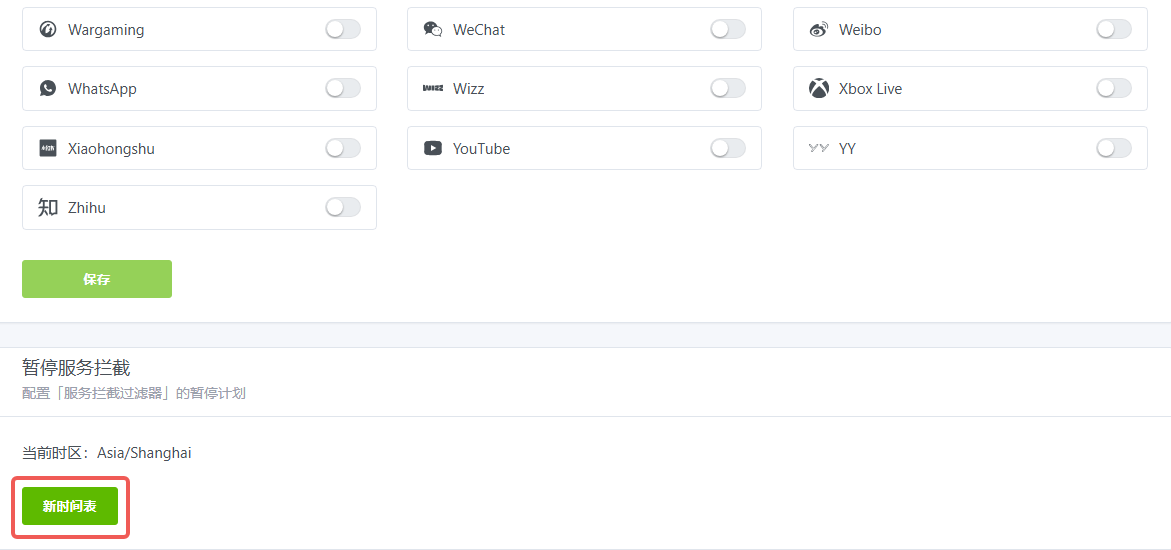
- Log in to AdGuard Private Service management interface
- Navigate to Filters -> Blocked Services
- Click the “Internet Schedule” option
- Set allowed or restricted internet access time periods
Usage Recommendations
- Set age-appropriate internet schedules for school children
- Configure different policies for weekdays and weekends
- Recommended to set unified bedtime restrictions
Important Notes
- Changes take effect immediately
- Schedule adjustments can be made anytime
- Supports temporary restriction removal