Setting Up Trusted DNS Providers
Categories:
When creating a paid service, it defaults to using faster domestic upstream services, including Alibaba’s IPv4, IPv6, and DoT services.
Some DNS providers may have resolution errors, resolving certain overseas websites to incorrect IP addresses, making them inaccessible. A common symptom is browsers reporting certificate errors.
To avoid resolution errors, you can switch to upstream providers like Cloudflare. When using such services, ensure you’re using the DoH or DoT protocols to prevent hijacking.
Additionally, you need to disable domestic upstream services because they are geographically closer and faster, causing AdGuard to prioritize them.
Add a # before the corresponding service IP to disable that upstream service.
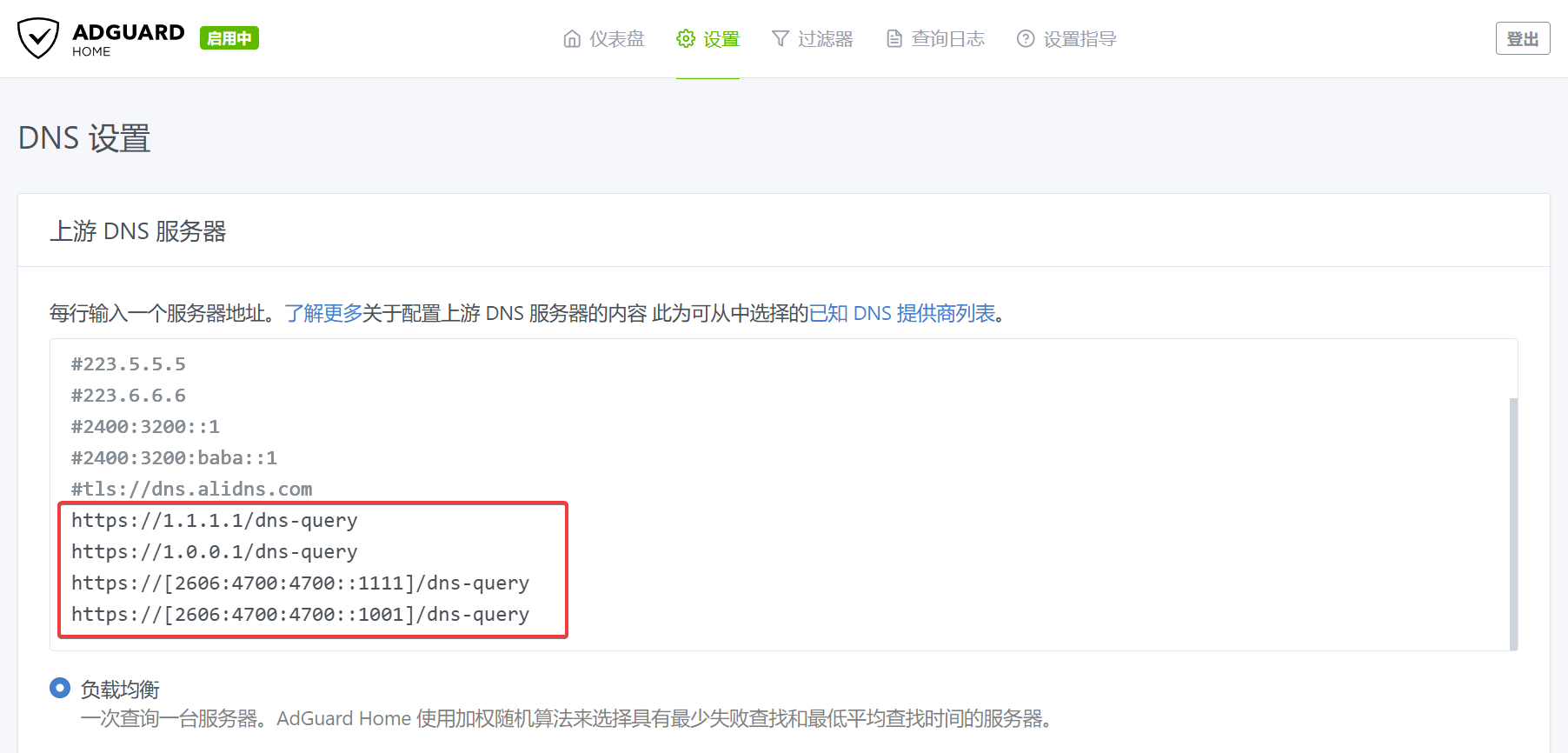
After configuration, Test Upstream to ensure the upstream server is available, then Apply.

However, using only overseas services may degrade the experience for domestic apps, as these apps typically resolve overseas domains to specific external servers with slower domestic access speeds.
If you only need to avoid resolution errors for commonly used services, you can manually specify DNS addresses for misresolved domains while keeping other domains on default domestic upstream services.
In the AdGuard console, go to Settings -> DNS Settings -> Upstream DNS Servers. Add misresolved domains in the format [/example1.com/example2.com/]tls://1.0.0.1 to Custom DNS Servers, then click Save Settings.
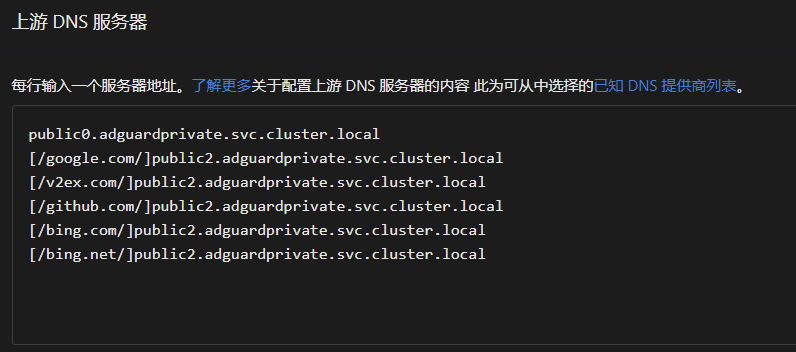
public2.adguardprivate.svc.cluster.local is our internally provided error-free resolution service, using Cloudflare as upstream. Compared to users manually specifying overseas upstreams, it offers faster resolution speeds at the cost of minor delays in DNS updates. Users without professional needs can use our error-free resolution service.
To use external Cloudflare or Google resolution addresses, specify IPs with DoT/DoH. Examples:
#tls://1.1.1.1
tls://1.0.0.1
tls://[2606:4700:4700::1111]
tls://[2606:4700:4700::1001]
tls://[2606:4700:4700::64]
tls://[2606:4700:4700::6400]
https://1.1.1.1/dns-query
https://1.0.0.1/dns-query
https://[2606:4700:4700::1111]/dns-query
https://[2606:4700:4700::1001]/dns-query
#tls://8.8.8.8
#tls://8.8.4.4
tls://[2001:4860:4860::8888]
tls://[2001:4860:4860::8844]
tls://[2001:4860:4860::64]
tls://[2001:4860:4860::6464]
#https://8.8.8.8/dns-query
#https://8.8.4.4/dns-query
#https://[2001:4860:4860::8888]/dns-query
https://[2001:4860:4860::8844]/dns-query
Addresses prefixed with
#are commented out, indicating they are currently blocked by firewalls and unavailable.
Our site fully supports IPv6, which is one of our key advantages. You can use IPv6 upstream addresses for more stable resolution speeds.